Train in Your Tab: PyTorch, JAX and ML Compilers in the Browser
From eager execution to compiled CPU and WebGPU workloads—all inside JupyterLite.
Open a notebook, import PyTorch, define a model, train it, and try a few predictions. Then send the same computation to the GPU.
That is the experience we have been working towards with JupyterLite, WebAssembly and WebGPU. Python, the ML frameworks, their compilers and the runtime executing the generated programs all run inside the browser. The server delivers the application, packages, datasets and model weights, the computation happens on your machine.
This work builds on emscripten-forge, which provides conda packages for WebAssembly. We use it to distribute the Python runtime, ML frameworks, compiler toolchains and native dependencies that these notebooks need.
Today, we can share working notebooks for eager PyTorch, TorchInductor, TorchAX, JAX/XLA, and PyTorch compilation through Turbine and IREE. They cover CPU execution, WebGPU training, image processing, and pretrained models for vision and speech.
The part that excites me most is having the compiler available alongside the framework. Change a model or write a new function in a cell, and the browser can compile and execute that new computation too.
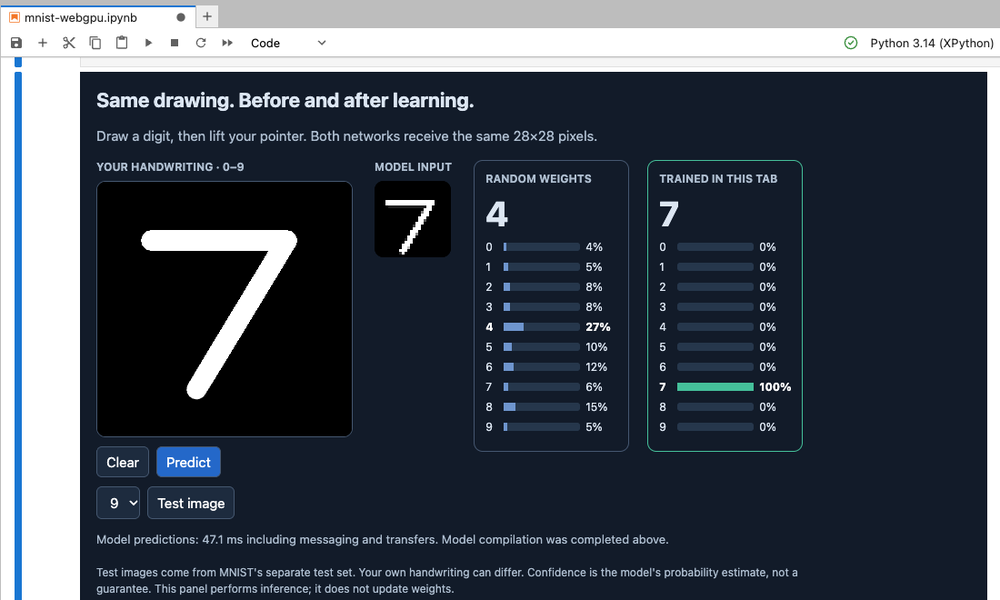
Comparing an untrained and trained MNIST classifier on the same handwritten digit, inside JupyterLite.
If you would like to start with the code, try the PyTorch CPU notebooks, object detection notebook, or MNIST CPU/WebGPU pair. The sections below explain how we got here.