Shipping Complex Qt Applications in the Browser with emscripten-forge

Shipping software efficiently means not rebuilding everything from scratch every time. You want to ship your app as a package, rely on a distribution system to handle dependencies, and share the burden of maintaining your stack with other projects that depend on it. That is the vision behind emscripten-forge, a general-purpose software distribution for WebAssembly.
Whether you're building a scientific library, a compiler, or a desktop application, emscripten-forge can be used to:
- ship your software as a package for a general-purpose package manager (like apt or conda),
- leverage shared dependencies: no need to rebuild what's already available,
- benefit from browser caching: shared objects stay cached, reducing load times and bandwidth.
Qt Applications in the Browser
Emscripten-forge has been used extensively to ship the open-source scientific computing stack (Python, R, etc.) alongside JupyterLite, and is progressively expanding to compiler stacks and console applications.
Emscripten-forge can now build & host Qt applications that run entirely in the browser. A compatible Qt6 desktop app can be built once for WASM, published as an ordinary conda package, and launched directly from the package repository, client-side, with no additional server behind it.
This also unlocks libraries that link against Qt, a common pattern for libraries that are attached to GUIs but can also be used independently. Once compiled, these libraries can now run interactively in the browser, for example with notebook.link. See pygplates on notebook.link for a live example using pygplates, a Python wrapper of the C++ library underlying the popular plate tectonics desktop application GPlates, which uses Qt extensively. Such GUI-free use is stable, fast, and unlocks many interesting use cases.
Running full Qt applications in the browser, including GUIs, may require custom patches, as well as case-by-case examination for compatibility (e.g., not all Qt subpackages are available), stability, and performance. But it's now a conceivable path for anyone who wants to take proven desktop software and make it dramatically more accessible without rewriting it.
You can try the following examples by clicking the links below:
(These links require a recent browser with JSPI support: Safari 27+, Chrome 137+, Firefox 153+.)


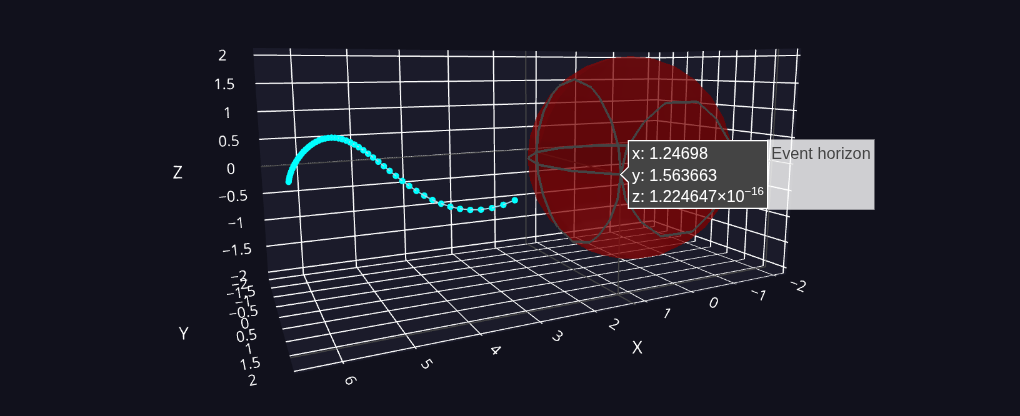 Fig above: Computation of a blackhole approach trajectory using