Create an environment
Before creating a Notebook.link project, you’ll need to either select an existing environment or create a new one on the Environment page.
Default environments
Notebook.link provides the following default environments:
- Default environment: includes a Python kernel only.
- Python Scientific Stack: includes a Python kernel with NumPy, Pandas, Matplotlib, and other essential libraries.
- Jupyter CAD Stack: preconfigured for computer-aided design workflows.
- Jupyter GIS Stack: optimized for geospatial data analysis and visualization.
- Jupyter Widgets Stack: equipped with interactive widget support.
- R Stack: includes an R kernel and all necessary tools for plotting and data analysis.
If one of those environments fits your need, you can already select it to create your own project
Custom environment
If the default environments do not meet your requirements, you can create a custom environment on the environment creation page.
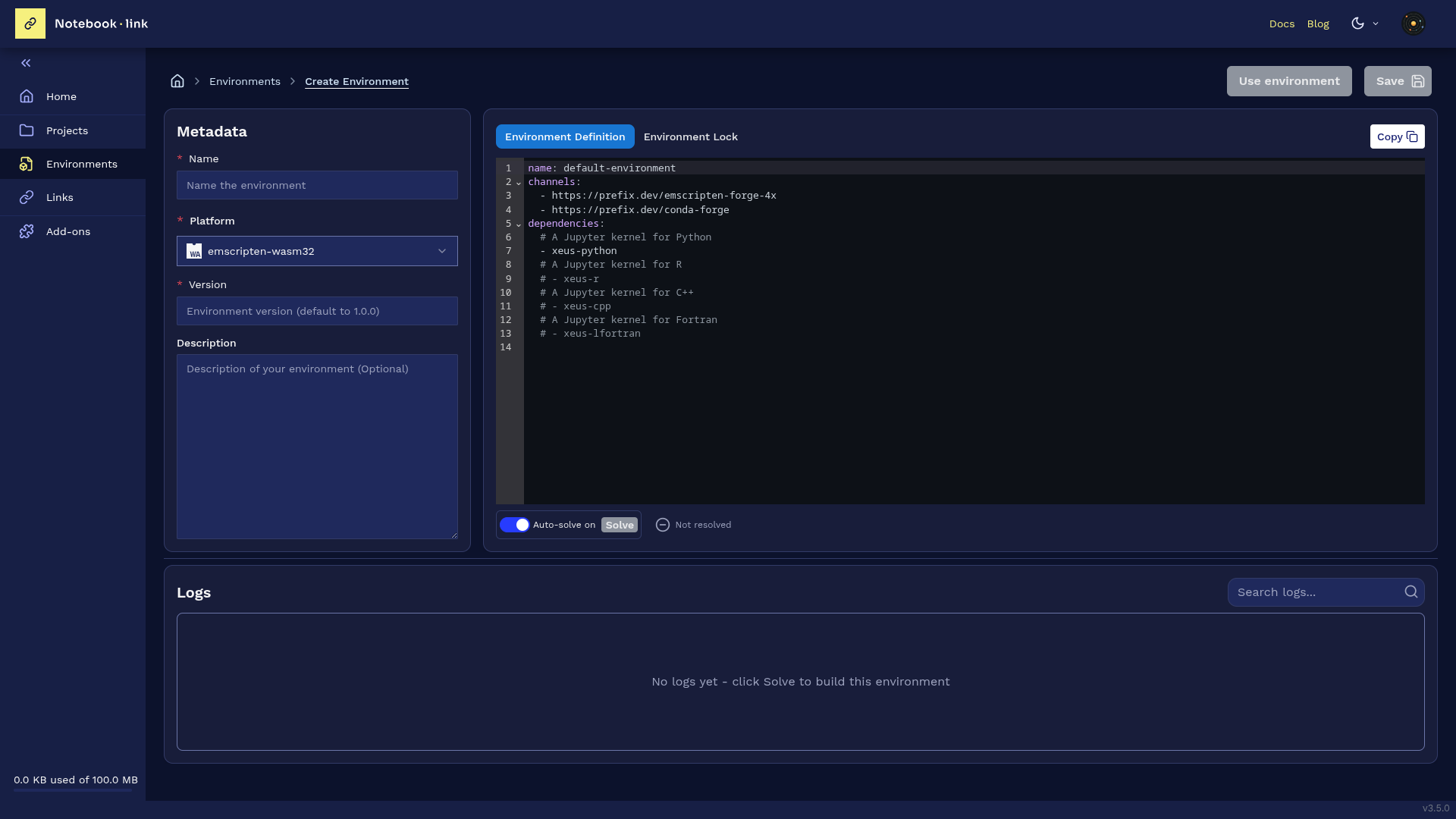
Environment creation form
On the environment creation page, you will need to provide:
- The environment name
- (Optional) a description for the environment
- The content of the
environment.ymlfile. This file is a conda environment definition, used to define the WASM environment that will be used in your project or link.
An example of such environment.yml file is as follows:
name: my-environment
channels:
  - https://prefix.dev/emscripten-forge-4x
  - https://prefix.dev/conda-forge
dependencies:
  - xeus-python # A Jupyter kernel for Python
  - pandas
  - matplotlib
  - xeus-r # A Jupyter kernel for R
  - xeus-cpp # A Jupyter kernel for C++
  - pip: # List pure Python packages from PyPi here
    - ipyleaflet
As general recommendations, please:
- Make sure to include the
https://prefix.dev/emscripten-forge-4xchannel - Install
xeus-pythoninstead ofipykernelif you need a Python kernel - Do not install
jupyterlab, it's already provided
If you want to get started with simple examples:
- Install the
xeus-pythonkernel - Add well-known Python packages like
matplotlib,bqplot, orscipyetc.
You can also install pure Python packages from PyPI using pip, such as:
foliumrequests
-
Package availability: Some packages are not yet available on
emscripten-forge. You can request new packages by opening an issue in the emscripten-forge repository or hire QuantStack to do the packaging: https://quantstack.net/fundable/EmscriptenForgePackageRequests. -
PyPI limitations: Only pure-Python packages distributed as wheels can be installed from PyPI.
Once created and saved, your environment can be modified further. You would need to provide a new version number.
Environment definition versus lock window
The following video shows how to switch between the 2 views: environment definition and environment lock.
Add a package to the environment
The following video shows how the environment is resolved in real-time when adding a package to the environment.
Search in environment resolution logs
The following video shows an example of searching a keyword like a package name in the logs.