Numba in the Browser: Unlocking a New Scientific Python Stack in JupyterLite
A JIT compiler—and its ecosystem—running entirely in the Web browser
Scientists, students, and engineers use Jupyter notebooks to explore ideas interactively: write a small piece of code, execute it, inspect the result, and continue from there. Traditionally, every such notebook requires a Python process running on a server or on the user's machine.
JupyterLite changes this model. Its kernels run locally in the Web browser through WebAssembly, so a static website can provide a complete computational environment without allocating a server to every user. This makes notebooks easier and cheaper to share at scale, whether they are used for documentation, education, or interactive demonstrations.
There has, however, been an important piece missing from the browser-based scientific Python ecosystem: Numba.
Today, we are excited to share the first working version of the Numba JIT compiler running entirely in the browser with JupyterLite and emscripten-forge!
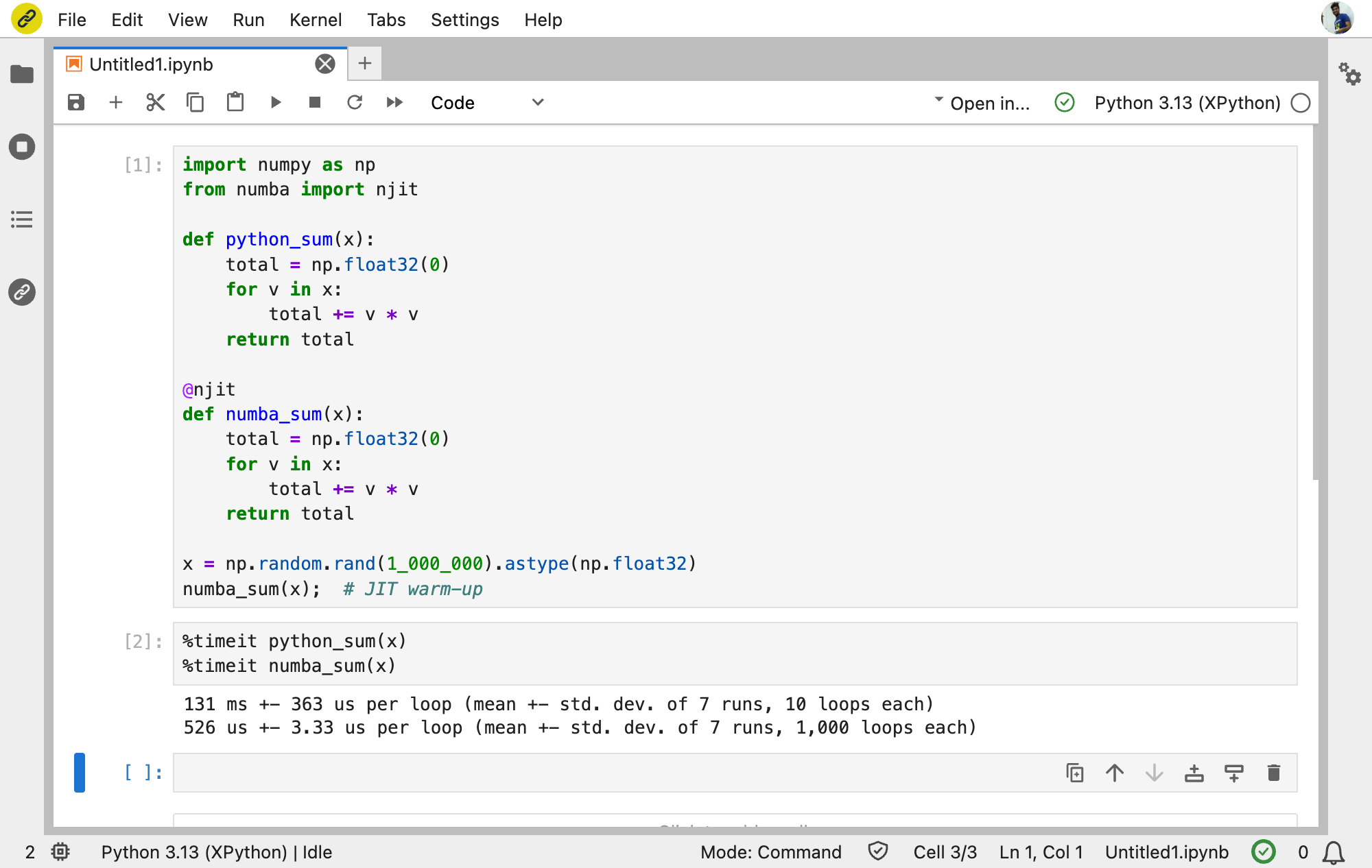
Numba in action in JupyterLite, showing a 249× speedup over standard Python.
In this example, Numba delivers a roughly 250× speedup in WebAssembly, compared with about 90× natively. The larger relative gain makes Numba especially compelling in the browser, where bypassing Python interpreter overhead can have an even greater impact.
This means that a Python function can be transformed into Numba's Intermediate Representation (IR), typed, lowered to LLVM IR, compiled into WebAssembly, dynamically linked, and executed—all without a remote Python server.
Try it here: Numba and its ecosystem in JupyterLite.
A long-standing request
Support for Numba in WebAssembly has been discussed for many years. The request appeared in the Numba project as early as 2018 in numba/numba#3284, while the Pyodide community tracked the packaging challenge in pyodide/pyodide-recipes#192.
The difficulty was not simply that Numba had never been packaged for WebAssembly. Numba is a compiler, and its execution model depends on llvmlite and LLVM. On a native platform, generated machine code can be placed into executable memory and called immediately. The browser deliberately does not allow applications to create or modify executable memory in this way.
Consequently, bringing Numba to the browser required more than adapting a build system or fixing a few platform checks. We needed a WebAssembly-aware execution engine for llvmlite, a way to invoke the LLVM linker inside the running browser process, and support for dynamically loading the generated code into the persistent Python runtime.
Fortunately, this was a problem we had encountered before.
From interactive C++ to llvmlite
Our earlier work on Xeus-Cpp in JupyterLite brought the Clang-Repl C++ interpreter to the browser. Clang-Repl cannot use LLVM's conventional JIT machinery under WebAssembly either, so we introduced a WebAssembly execution model with a different pipeline:
- Compile the generated LLVM IR into a WebAssembly object file.
- Link that object with
wasm-ldinto a WebAssembly side module—the WebAssembly equivalent of a dynamically loaded shared library. - Dynamically load the side module into the running application.
- Resolve its symbols and call the compiled function.
Each new input incrementally extends the running program. The newly loaded side module shares memory with the main application, and its exported symbols can be used by modules loaded later.
This work is now the foundation of Xeus-Cpp in the browser. It is also the subject of our FOSDEM 2026 talk on interactive C++ workflows.
The central realization behind this project was that a similar architecture could be applied to llvmlite.
We implemented a WebAssembly execution engine that takes LLVM modules produced through llvmlite, emits WebAssembly objects, invokes LLVM's linker, LLD, through its in-process re-entrant driver, and loads each result as an Emscripten side module. Using LLD in process is essential: spawning a wasm-ld subprocess is not an option inside the browser.
The modules are loaded globally and kept alive, allowing runtime libraries, compiler-generated helpers, and user functions to resolve one another. This gives llvmlite the incremental execution behavior required by Numba while respecting the browser's security model.
Before moving further up the stack, we used this engine directly to compile, optimize, inspect, and execute LLVM IR. We also enabled in-process Graphviz rendering, making it possible to display control-flow graphs without launching the dot executable as a subprocess.
You can explore this lower-level pipeline here: llvmlite and Graphviz in JupyterLite.
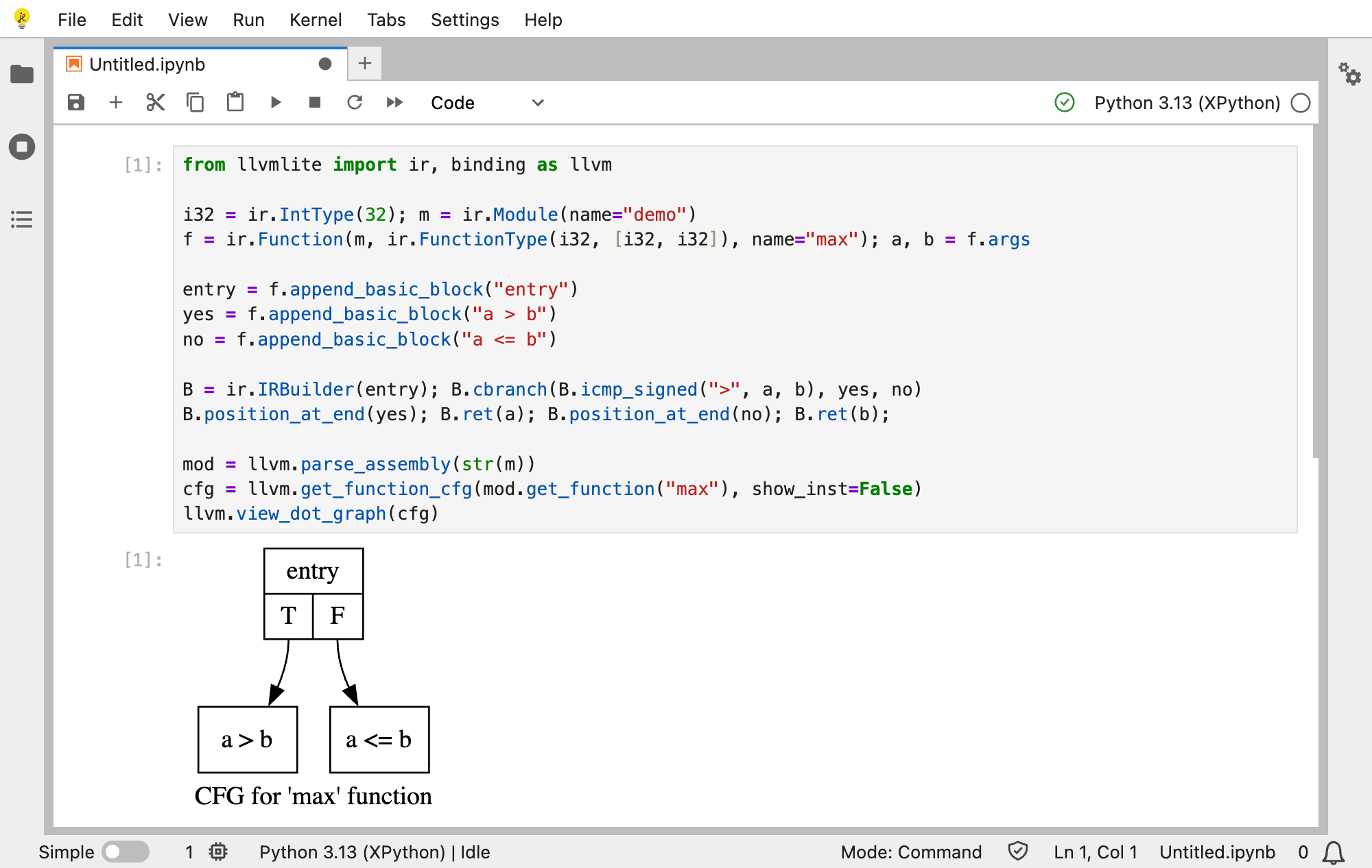
Building LLVM IR and rendering its control-flow graph entirely in the browser.
Walking up the stack to Numba
Numba begins at a much friendlier level. A user writes an ordinary Python function and applies @jit or @njit:
from numba import njit

@njit
def add(a, b):
    return a + b

add(1.0, 2.5)
Behind this small example lies a complete compiler pipeline. Numba reads the Python bytecode and constructs its own intermediate representation. It infers concrete types for the arguments and intermediate values, performs compiler transformations, and lowers the typed program to LLVM IR through llvmlite.
On a native machine, llvmlite would hand the result to LLVM's JIT execution engine. In JupyterLite, it instead hands the module to the new WebAssembly engine. The module is compiled, linked as a side module, loaded into the running Xeus-Python kernel, and exposed through the WebAssembly function table so that Numba can call it.
A single user function can involve several modules. Numba may first load runtime support such as the Numba Runtime (NRT), then compiler-generated helpers, and finally the module containing the user function and its CPython-callable wrapper. These modules must be loaded in the correct order so that later code can resolve symbols provided by earlier modules.
We also added persistent object caching through @njit(cache=True). When a cache-enabled function is used again in a later browser session, Numba restores its cached compilation data from JupyterLite's persistent filesystem. llvmlite reuses the corresponding WebAssembly object, while relinking and loading a fresh side module into the new kernel process.
The result is genuine Numba compilation and execution in the browser—not an interpreter that imitates Numba, and not a remote service hidden behind the notebook.
Packaging Numba on emscripten-forge
Once we got Numba to work in the browser, the key to adoption is being able to distribute the software. This is where emscripten-forge comes in. Emscripten-forge is a software distribution for WebAssembly in the browser. It is built upon the conda/mamba stack and conda-forge, and provides a complete package management solution for the Web browser, and a broad collection of packages, including the Python scientific stack (NumPy, SciPy, LLVM, Clang, LLD), the R stack, but also native command-line applications and complete toolchains.
Numba is now available in emscripten-forge, and can now be easily used in JupyterLite deployments!
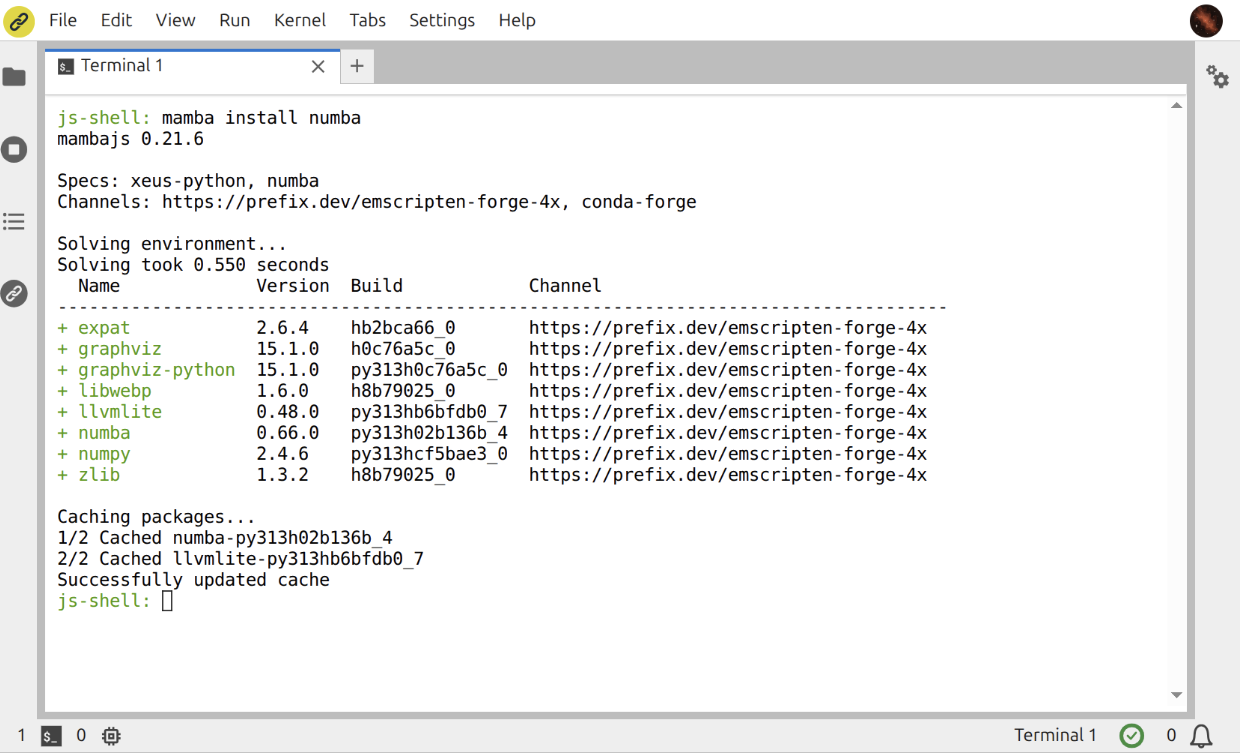
Dynamically installing the WebAssembly build of Numba with Mamba in the JupyterLite terminal.
Unlocking the ecosystem above Numba
Getting a scalar addition to compile is an important milestone, but the broader motivation is the ecosystem that becomes possible once Numba is available.
Our demonstration starts with recognizable Numba examples and numerical array kernels. It then walks upward through packages that use Numba directly or through their own compilation backends:
- PyTensor can compile symbolic numerical graphs using its Numba linker.
- PyMC, built on PyTensor, brings familiar probabilistic models into the same browser environment.
- interpolation.py provides Numba-accelerated interpolation routines used in numerical economics.
- Dolo.py builds on this stack to provide JIT-aware numerical routines for economists (stochastic processes, decision rules), along with optimized solution methods for dynamic programming problems.
In other words, enabling one compiler unlocks considerably more than one package. It opens a path for statistics, probability, economics, and scientific computing libraries that previously could not bring their full execution model to JupyterLite.
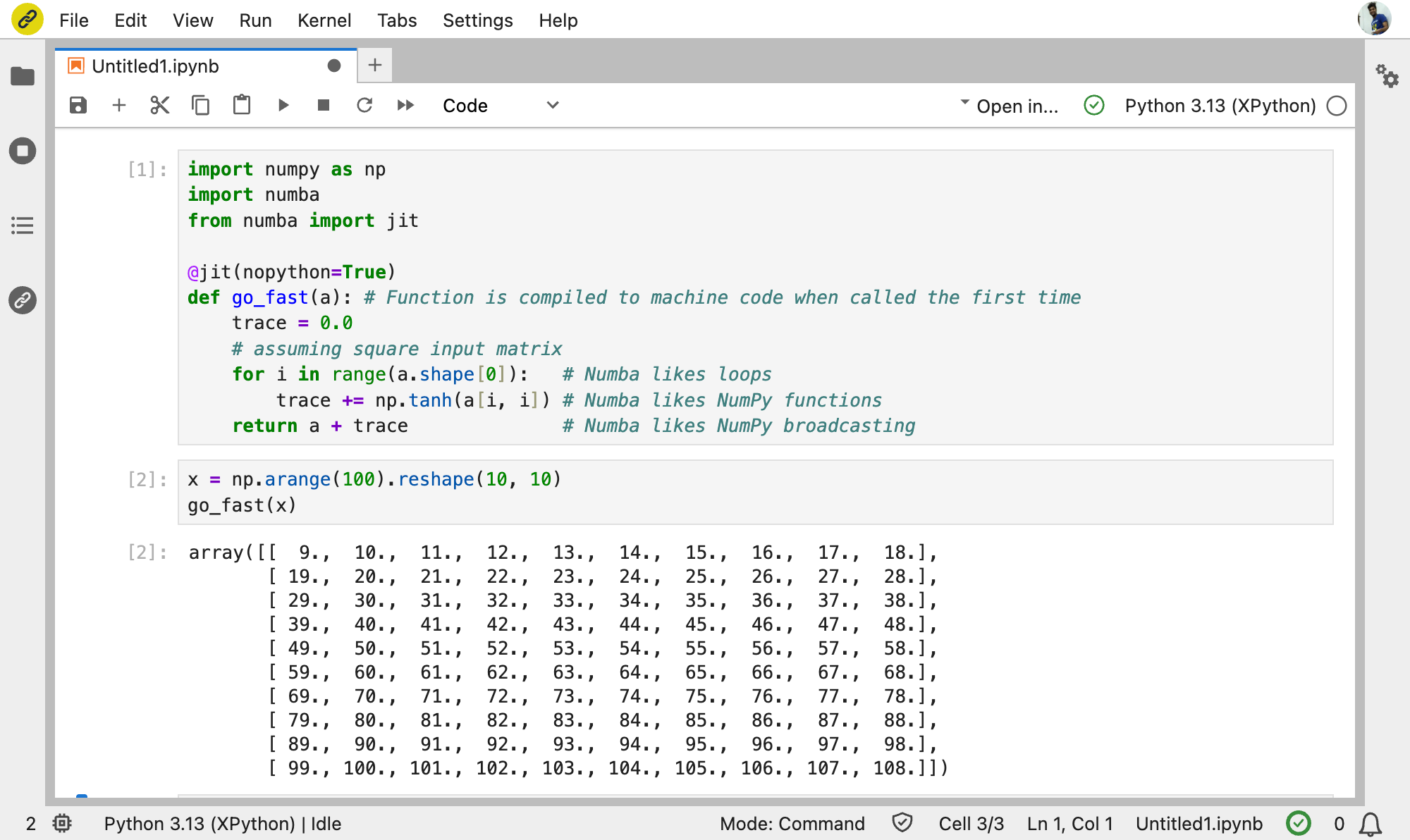
The Numba ecosystem running through Xeus-Python in JupyterLite.
Try the complete progression here: Numba, PyTensor, PyMC, Interpolation.py, and Dolo.py in the browser.
What comes next?
The current work establishes the end-to-end architecture, but there is more to do. We want to move the changes upstream in focused contributions, expand test coverage across the Numba and llvmlite suites, improve performance and persistent caching, and validate more packages from the wider Numba ecosystem.
WebAssembly target features such as SIMD also provide an exciting direction for numerical kernels. At the ecosystem level, projects that rely on Numba can now be evaluated for browser support instead of excluding WebAssembly from the outset.
Most importantly, this work demonstrates that a sophisticated compiler stack does not have to stop at the boundary of the Web browser. With LLVM, LLD, llvmlite, and Numba available through emscripten-forge, JupyterLite can grow from a lightweight Python environment into a platform for serious compiled scientific computing.
We are excited to see what the community builds on top of it!
About the author
Anutosh Bhat is a scientific software developer at QuantStack. He is an LLVM maintainer and a co-author of the Xeus-Cpp Jupyter kernel for C++. Anutosh led the WebAssembly integration for llvmlite and Numba.
Acknowledgements
This work was developed at QuantStack and builds on contributions across LLVM, Clang-Repl, Emscripten, llvmlite, Numba, Xeus-Python, JupyterLite, Graphviz, and emscripten-forge.
We are grateful to the maintainers and contributors of these projects, and particularly to the Numba community for the discussion around upstreaming this work.