<?xml version="1.0" encoding="utf-8"?>
<feed xmlns="http://www.w3.org/2005/Atom">
    <id>https://notebook.link/blog/</id>
    <title>Notebook.link Documentation Blog</title>
    <updated>2026-08-11T00:00:00.000Z</updated>
    <generator>https://github.com/jpmonette/feed</generator>
    <link rel="alternate" href="https://notebook.link/blog/"/>
    <subtitle>Notebook.link Documentation Blog</subtitle>
    <icon>https://notebook.link/blog/img/NotebookLink/favicon.svg</icon>
    <entry>
        <title type="html"><![CDATA[Numba in the Browser: Unlocking a New Scientific Python Stack in JupyterLite]]></title>
        <id>https://notebook.link/blog/numba-in-the-browser</id>
        <link href="https://notebook.link/blog/numba-in-the-browser"/>
        <updated>2026-08-11T00:00:00.000Z</updated>
        <summary type="html"><![CDATA[A JIT compiler and its scientific Python ecosystem running entirely in the Web browser]]></summary>
        <content type="html"><![CDATA[<h2 class="anchor anchorWithStickyNavbar_LWe7" id="a-jit-compilerand-its-ecosystemrunning-entirely-in-the-web-browser">A JIT compiler—and its ecosystem—running entirely in the Web browser<a href="https://notebook.link/blog/numba-in-the-browser#a-jit-compilerand-its-ecosystemrunning-entirely-in-the-web-browser" class="hash-link" aria-label="Direct link to A JIT compiler—and its ecosystem—running entirely in the Web browser" title="Direct link to A JIT compiler—and its ecosystem—running entirely in the Web browser">​</a></h2>
<p>Scientists, students, and engineers use Jupyter notebooks to explore ideas interactively: write a small piece of code, execute it, inspect the result, and continue from there. Traditionally, every such notebook requires a Python process running on a server or on the user's machine.</p>
<p>JupyterLite changes this model. Its kernels run locally in the Web browser through WebAssembly, so a static website can provide a complete computational environment without allocating a server to every user. This makes notebooks easier and cheaper to share at scale, whether they are used for documentation, education, or interactive demonstrations.</p>
<p>There has, however, been an important piece missing from the browser-based scientific Python ecosystem: <strong>Numba</strong>.</p>
<p>Today, we are excited to share the first working version of the Numba JIT compiler running entirely in the browser with JupyterLite and emscripten-forge!</p>
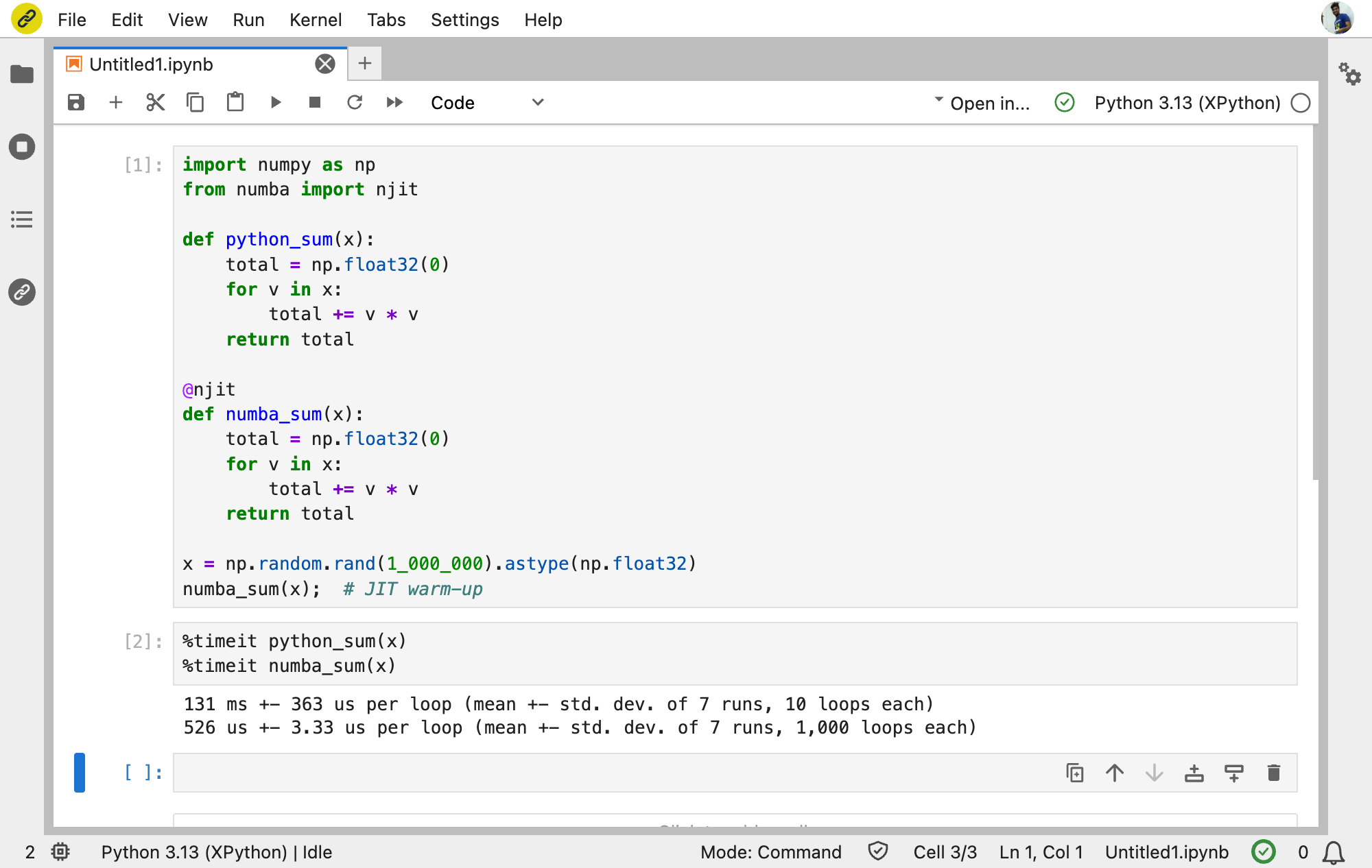
<p align="center"></p><p><img decoding="async" loading="lazy" alt="Numba benchmark in JupyterLite" src="https://notebook.link/blog/assets/images/timeit-b0dc29c7faaada7658a6dcc8b3c88c3f.png" width="2000" height="1266" class="img_ev3q"></p><p><em>Numba in action in JupyterLite, showing a 249× speedup over standard Python.</em></p><p></p>
<p>In this example, Numba delivers a roughly 250× speedup in WebAssembly, compared with about 90× natively. The larger relative gain makes Numba especially compelling in the browser, where bypassing Python interpreter overhead can have an even greater impact.</p>
<p>This means that a Python function can be transformed into Numba's Intermediate Representation (IR), typed, lowered to LLVM IR, compiled into WebAssembly, dynamically linked, and executed—all without a remote Python server.</p>
<p>Try it here: <a href="https://notebook.link/@anutosh491/numba-ecosystem" target="_blank" rel="noopener noreferrer">Numba and its ecosystem in JupyterLite</a>.</p>
<h2 class="anchor anchorWithStickyNavbar_LWe7" id="a-long-standing-request">A long-standing request<a href="https://notebook.link/blog/numba-in-the-browser#a-long-standing-request" class="hash-link" aria-label="Direct link to A long-standing request" title="Direct link to A long-standing request">​</a></h2>
<p>Support for Numba in WebAssembly has been discussed for many years. The request appeared in the Numba project as early as 2018 in <a href="https://github.com/numba/numba/issues/3284" target="_blank" rel="noopener noreferrer">numba/numba#3284</a>, while the Pyodide community tracked the packaging challenge in <a href="https://github.com/pyodide/pyodide-recipes/issues/192" target="_blank" rel="noopener noreferrer">pyodide/pyodide-recipes#192</a>.</p>
<p>The difficulty was not simply that Numba had never been packaged for WebAssembly. Numba is a compiler, and its execution model depends on llvmlite and LLVM. On a native platform, generated machine code can be placed into executable memory and called immediately. The browser deliberately does not allow applications to create or modify executable memory in this way.</p>
<p>Consequently, bringing Numba to the browser required more than adapting a build system or fixing a few platform checks. We needed a WebAssembly-aware execution engine for llvmlite, a way to invoke the LLVM linker inside the running browser process, and support for dynamically loading the generated code into the persistent Python runtime.</p>
<p>Fortunately, this was a problem we had encountered before.</p>
<h2 class="anchor anchorWithStickyNavbar_LWe7" id="from-interactive-c-to-llvmlite">From interactive C++ to llvmlite<a href="https://notebook.link/blog/numba-in-the-browser#from-interactive-c-to-llvmlite" class="hash-link" aria-label="Direct link to From interactive C++ to llvmlite" title="Direct link to From interactive C++ to llvmlite">​</a></h2>
<p>Our earlier work on <a href="https://medium.com/jupyter-blog/c-in-jupyter-interpreting-c-in-the-web-c9d93542f20b" target="_blank" rel="noopener noreferrer">Xeus-Cpp in JupyterLite</a> brought the Clang-Repl C++ interpreter to the browser. Clang-Repl cannot use LLVM's conventional JIT machinery under WebAssembly either, so we introduced a WebAssembly execution model with a different pipeline:</p>
<ol>
<li>Compile the generated LLVM IR into a WebAssembly object file.</li>
<li>Link that object with <code>wasm-ld</code> into a WebAssembly side module—the WebAssembly equivalent of a dynamically loaded shared library.</li>
<li>Dynamically load the side module into the running application.</li>
<li>Resolve its symbols and call the compiled function.</li>
</ol>
<p>Each new input incrementally extends the running program. The newly loaded side module shares memory with the main application, and its exported symbols can be used by modules loaded later.</p>
<p>This work is now the foundation of Xeus-Cpp in the browser. It is also the subject of our <a href="https://fosdem.org/2026/schedule/event/QX3RPH-building_interactive_cc_workflows_in_jupyter_through_clang-repl/" target="_blank" rel="noopener noreferrer">FOSDEM 2026 talk on interactive C++ workflows</a>.</p>
<p>The central realization behind this project was that a similar architecture could be applied to llvmlite.</p>
<p>We implemented a WebAssembly execution engine that takes LLVM modules produced through llvmlite, emits WebAssembly objects, invokes LLVM's linker, LLD, through its in-process re-entrant driver, and loads each result as an Emscripten side module. Using LLD in process is essential: spawning a <code>wasm-ld</code> subprocess is not an option inside the browser.</p>
<p>The modules are loaded globally and kept alive, allowing runtime libraries, compiler-generated helpers, and user functions to resolve one another. This gives llvmlite the incremental execution behavior required by Numba while respecting the browser's security model.</p>
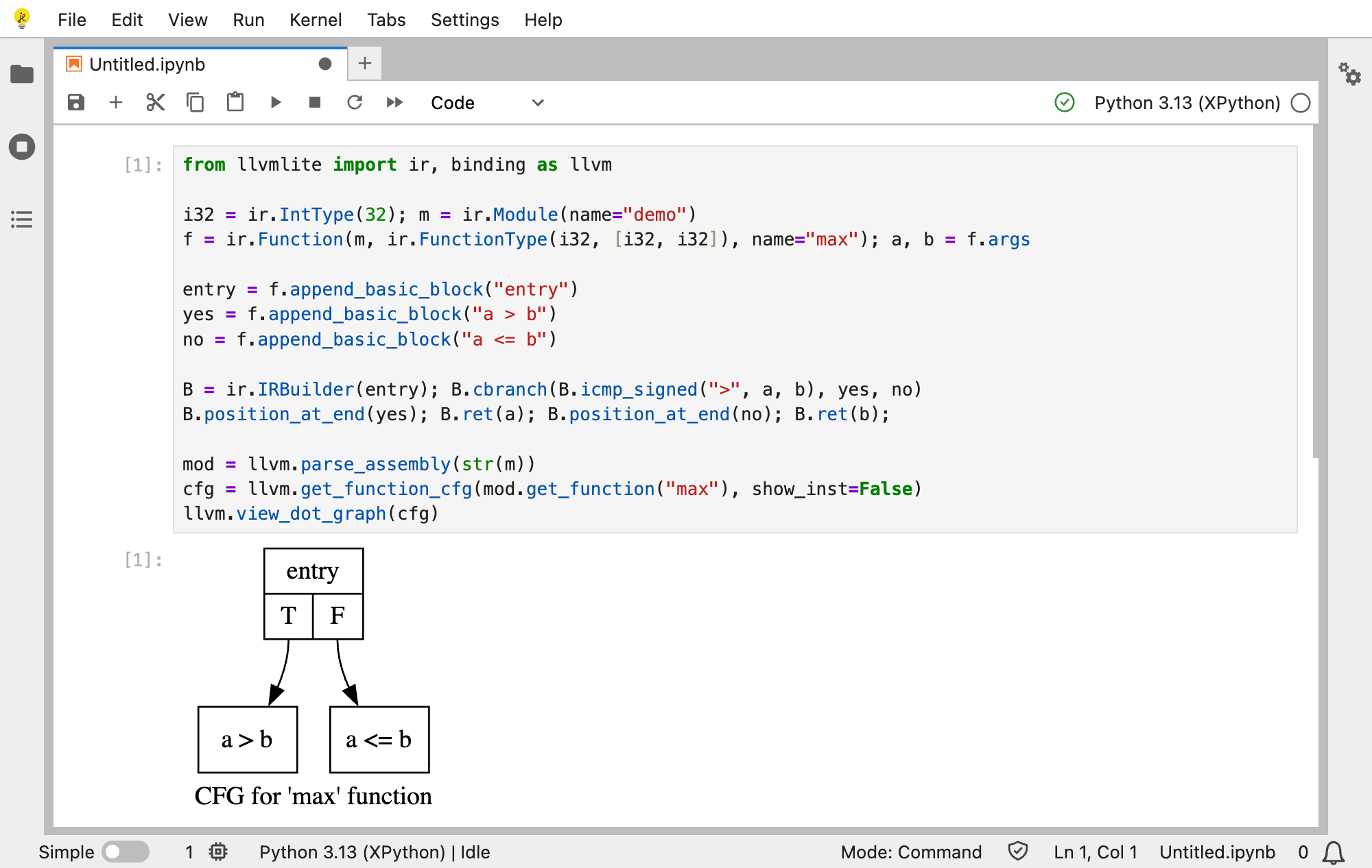
<p>Before moving further up the stack, we used this engine directly to compile, optimize, inspect, and execute LLVM IR. We also enabled in-process Graphviz rendering, making it possible to display control-flow graphs without launching the <code>dot</code> executable as a subprocess.</p>
<p>You can explore this lower-level pipeline here: <a href="https://notebook.link/@anutosh491/llvmlite" target="_blank" rel="noopener noreferrer">llvmlite and Graphviz in JupyterLite</a>.</p>
<p align="center"></p><p><img decoding="async" loading="lazy" alt="An LLVM control-flow graph rendered in JupyterLite" src="https://notebook.link/blog/assets/images/llvmlite-b7798b48286edc4d33f59cca3eeff32c.png" width="2000" height="1266" class="img_ev3q"></p><p><em>Building LLVM IR and rendering its control-flow graph entirely in the browser.</em></p><p></p>
<h2 class="anchor anchorWithStickyNavbar_LWe7" id="walking-up-the-stack-to-numba">Walking up the stack to Numba<a href="https://notebook.link/blog/numba-in-the-browser#walking-up-the-stack-to-numba" class="hash-link" aria-label="Direct link to Walking up the stack to Numba" title="Direct link to Walking up the stack to Numba">​</a></h2>
<p>Numba begins at a much friendlier level. A user writes an ordinary Python function and applies <code>@jit</code> or <code>@njit</code>:</p>
<div class="language-python codeBlockContainer_Ckt0 theme-code-block" style="--prism-color:#F8F8F2;--prism-background-color:#282A36"><div class="codeBlockContent_QJqH"><pre tabindex="0" class="prism-code language-python codeBlock_bY9V thin-scrollbar" style="color:#F8F8F2;background-color:#282A36"><code class="codeBlockLines_e6Vv"><span class="token-line" style="color:#F8F8F2"><span class="token keyword" style="color:rgb(189, 147, 249);font-style:italic">from</span><span class="token plain"> numba </span><span class="token keyword" style="color:rgb(189, 147, 249);font-style:italic">import</span><span class="token plain"> njit</span><br></span><span class="token-line" style="color:#F8F8F2"><span class="token plain" style="display:inline-block"></span><br></span><span class="token-line" style="color:#F8F8F2"><span class="token plain"></span><span class="token decorator annotation punctuation" style="color:rgb(248, 248, 242)">@njit</span><span class="token plain"></span><br></span><span class="token-line" style="color:#F8F8F2"><span class="token plain"></span><span class="token keyword" style="color:rgb(189, 147, 249);font-style:italic">def</span><span class="token plain"> </span><span class="token function" style="color:rgb(80, 250, 123)">add</span><span class="token punctuation" style="color:rgb(248, 248, 242)">(</span><span class="token plain">a</span><span class="token punctuation" style="color:rgb(248, 248, 242)">,</span><span class="token plain"> b</span><span class="token punctuation" style="color:rgb(248, 248, 242)">)</span><span class="token punctuation" style="color:rgb(248, 248, 242)">:</span><span class="token plain"></span><br></span><span class="token-line" style="color:#F8F8F2"><span class="token plain">    </span><span class="token keyword" style="color:rgb(189, 147, 249);font-style:italic">return</span><span class="token plain"> a </span><span class="token operator">+</span><span class="token plain"> b</span><br></span><span class="token-line" style="color:#F8F8F2"><span class="token plain" style="display:inline-block"></span><br></span><span class="token-line" style="color:#F8F8F2"><span class="token plain">add</span><span class="token punctuation" style="color:rgb(248, 248, 242)">(</span><span class="token number">1.0</span><span class="token punctuation" style="color:rgb(248, 248, 242)">,</span><span class="token plain"> </span><span class="token number">2.5</span><span class="token punctuation" style="color:rgb(248, 248, 242)">)</span><br></span></code></pre></div></div>
<p>Behind this small example lies a complete compiler pipeline. Numba reads the Python bytecode and constructs its own intermediate representation. It infers concrete types for the arguments and intermediate values, performs compiler transformations, and lowers the typed program to LLVM IR through llvmlite.</p>
<p>On a native machine, llvmlite would hand the result to LLVM's JIT execution engine. In JupyterLite, it instead hands the module to the new WebAssembly engine. The module is compiled, linked as a side module, loaded into the running Xeus-Python kernel, and exposed through the WebAssembly function table so that Numba can call it.</p>
<p>A single user function can involve several modules. Numba may first load runtime support such as the Numba Runtime (NRT), then compiler-generated helpers, and finally the module containing the user function and its CPython-callable wrapper. These modules must be loaded in the correct order so that later code can resolve symbols provided by earlier modules.</p>
<p>We also added persistent object caching through <code>@njit(cache=True)</code>. When a cache-enabled function is used again in a later browser session, Numba restores its cached compilation data from JupyterLite's persistent filesystem. llvmlite reuses the corresponding WebAssembly object, while relinking and loading a fresh side module into the new kernel process.</p>
<p>The result is genuine Numba compilation and execution in the browser—not an interpreter that imitates Numba, and not a remote service hidden behind the notebook.</p>
<h2 class="anchor anchorWithStickyNavbar_LWe7" id="packaging-numba-on-emscripten-forge">Packaging Numba on emscripten-forge<a href="https://notebook.link/blog/numba-in-the-browser#packaging-numba-on-emscripten-forge" class="hash-link" aria-label="Direct link to Packaging Numba on emscripten-forge" title="Direct link to Packaging Numba on emscripten-forge">​</a></h2>
<p>Once we got Numba to work in the browser, the key to adoption is being able to distribute the software. This is where <a href="https://emscripten-forge.org/" target="_blank" rel="noopener noreferrer">emscripten-forge</a> comes in. Emscripten-forge is a software distribution for WebAssembly in the browser. It is built upon the conda/mamba stack and conda-forge, and provides a complete package management solution for the Web browser, and a broad collection of packages, including the Python scientific stack (NumPy, SciPy, LLVM, Clang, LLD), the R stack, but also native command-line applications and complete toolchains.</p>
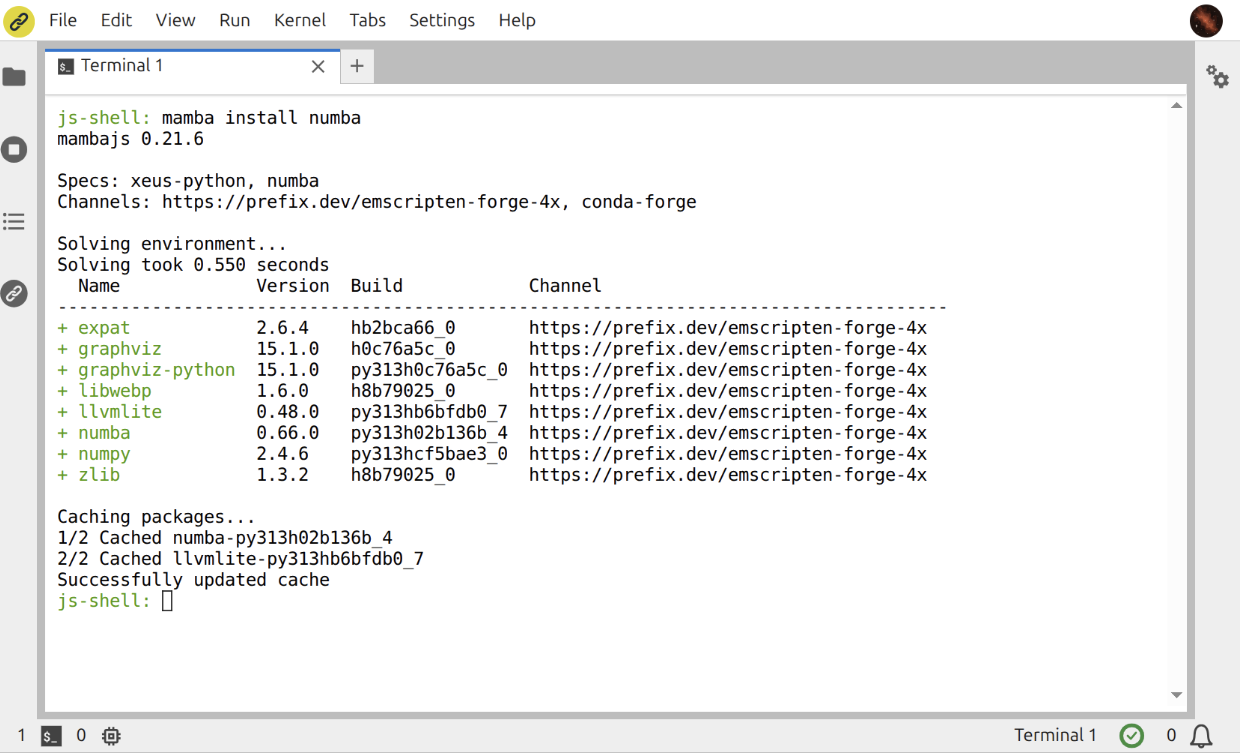
<p>Numba is now available in emscripten-forge, and can now be easily used in JupyterLite deployments!</p>
<p align="center"></p><p><img decoding="async" loading="lazy" alt="Installing Numba with Mamba inside JupyterLite" src="https://notebook.link/blog/assets/images/mamba_magic-ffc55002364d1b7931a1e7101ba9462a.png" width="1244" height="756" class="img_ev3q"></p><p><em>Dynamically installing the WebAssembly build of Numba with Mamba in the JupyterLite terminal.</em></p><p></p>
<h2 class="anchor anchorWithStickyNavbar_LWe7" id="unlocking-the-ecosystem-above-numba">Unlocking the ecosystem above Numba<a href="https://notebook.link/blog/numba-in-the-browser#unlocking-the-ecosystem-above-numba" class="hash-link" aria-label="Direct link to Unlocking the ecosystem above Numba" title="Direct link to Unlocking the ecosystem above Numba">​</a></h2>
<p>Getting a scalar addition to compile is an important milestone, but the broader motivation is the ecosystem that becomes possible once Numba is available.</p>
<p>Our demonstration starts with recognizable Numba examples and numerical array kernels. It then walks upward through packages that use Numba directly or through their own compilation backends:</p>
<ul>
<li><a href="https://pytensor.readthedocs.io/en/latest/" target="_blank" rel="noopener noreferrer"><strong>PyTensor</strong></a> can compile symbolic numerical graphs using its Numba linker.</li>
<li><a href="https://www.pymc.io/welcome.html" target="_blank" rel="noopener noreferrer"><strong>PyMC</strong></a>, built on PyTensor, brings familiar probabilistic models into the same browser environment.</li>
<li><a href="https://github.com/EconForge/interpolation.py" target="_blank" rel="noopener noreferrer"><strong>interpolation.py</strong></a> provides Numba-accelerated interpolation routines used in numerical economics.</li>
<li><a href="http://econforge.org/dolo.py" target="_blank" rel="noopener noreferrer"><strong>Dolo.py</strong></a> builds on this stack to provide JIT-aware numerical routines for economists (stochastic processes, decision rules), along with optimized solution methods for dynamic programming problems.</li>
</ul>
<p>In other words, enabling one compiler unlocks considerably more than one package. It opens a path for statistics, probability, economics, and scientific computing libraries that previously could not bring their full execution model to JupyterLite.</p>
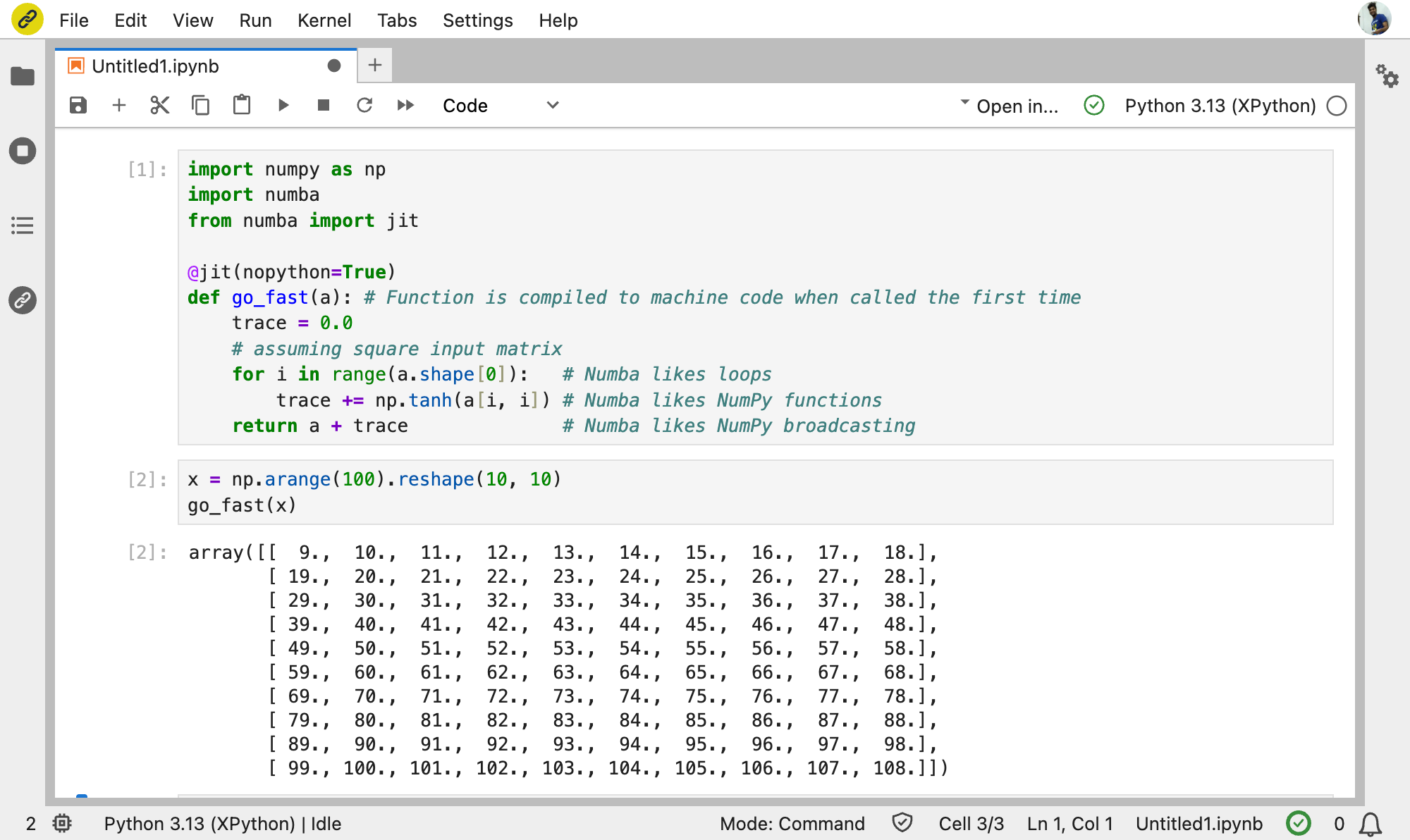
<p align="center"></p><p><img decoding="async" loading="lazy" alt="The Numba ecosystem running in JupyterLite" src="https://notebook.link/blog/assets/images/go_fast-d223a4dfb7d35bb551af43a0aef751e4.png" width="2000" height="1192" class="img_ev3q"></p><p><em>The Numba ecosystem running through Xeus-Python in JupyterLite.</em></p><p></p>
<p>Try the complete progression here: <a href="https://notebook.link/@anutosh491/numba-ecosystem" target="_blank" rel="noopener noreferrer">Numba, PyTensor, PyMC, Interpolation.py, and Dolo.py in the browser</a>.</p>
<h2 class="anchor anchorWithStickyNavbar_LWe7" id="what-comes-next">What comes next?<a href="https://notebook.link/blog/numba-in-the-browser#what-comes-next" class="hash-link" aria-label="Direct link to What comes next?" title="Direct link to What comes next?">​</a></h2>
<p>The current work establishes the end-to-end architecture, but there is more to do. We want to move the changes upstream in focused contributions, expand test coverage across the Numba and llvmlite suites, improve performance and persistent caching, and validate more packages from the wider Numba ecosystem.</p>
<p>WebAssembly target features such as SIMD also provide an exciting direction for numerical kernels. At the ecosystem level, projects that rely on Numba can now be evaluated for browser support instead of excluding WebAssembly from the outset.</p>
<p>Most importantly, this work demonstrates that a sophisticated compiler stack does not have to stop at the boundary of the Web browser. With LLVM, LLD, llvmlite, and Numba available through emscripten-forge, JupyterLite can grow from a lightweight Python environment into a platform for serious compiled scientific computing.</p>
<p>We are excited to see what the community builds on top of it!</p>
<h2 class="anchor anchorWithStickyNavbar_LWe7" id="about-the-author">About the author<a href="https://notebook.link/blog/numba-in-the-browser#about-the-author" class="hash-link" aria-label="Direct link to About the author" title="Direct link to About the author">​</a></h2>
<p>Anutosh Bhat is a scientific software developer at QuantStack. He is an LLVM maintainer and a co-author of the Xeus-Cpp Jupyter kernel for C++. Anutosh led the WebAssembly integration for llvmlite and Numba.</p>
<h2 class="anchor anchorWithStickyNavbar_LWe7" id="acknowledgements">Acknowledgements<a href="https://notebook.link/blog/numba-in-the-browser#acknowledgements" class="hash-link" aria-label="Direct link to Acknowledgements" title="Direct link to Acknowledgements">​</a></h2>
<p>This work was developed at QuantStack and builds on contributions across LLVM, Clang-Repl, Emscripten, llvmlite, Numba, Xeus-Python, JupyterLite, Graphviz, and emscripten-forge.</p>
<p>We are grateful to the maintainers and contributors of these projects, and particularly to the Numba community for the discussion around upstreaming this work.</p>]]></content>
        <author>
            <name>Anutosh Bhat</name>
            <uri>https://notebook.link/@anutosh491</uri>
        </author>
        <category label="jupyter" term="jupyter"/>
        <category label="jupyterlite" term="jupyterlite"/>
        <category label="webassembly" term="webassembly"/>
        <category label="python" term="python"/>
        <category label="numba" term="numba"/>
        <category label="scientific-computing" term="scientific-computing"/>
    </entry>
    <entry>
        <title type="html"><![CDATA[What Is Browser-Native Scientific Computing?]]></title>
        <id>https://notebook.link/blog/what-is-browser-native-scientific-computing</id>
        <link href="https://notebook.link/blog/what-is-browser-native-scientific-computing"/>
        <updated>2026-06-22T00:00:00.000Z</updated>
        <summary type="html"><![CDATA[Sharing scientific compute environments at web scale]]></summary>
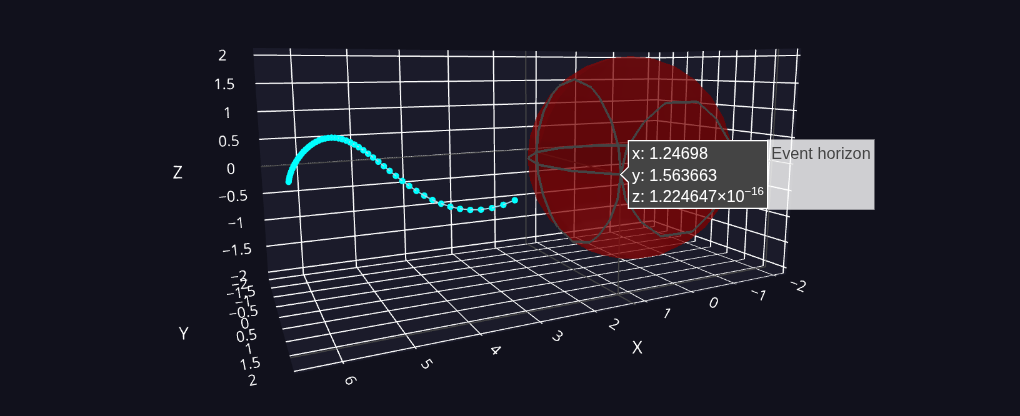
        <content type="html"><![CDATA[<p align="center"></p><p><img decoding="async" loading="lazy" alt="Black Hole" src="https://notebook.link/blog/assets/images/black_hole-cec92088c4639c3a4809900da3d1add6.png" width="1020" height="416" class="img_ev3q">
<em>Fig above: Computation of a blackhole approach trajectory using <a href="https://einsteinpy.org/" target="_blank" rel="noopener noreferrer">EinsteinPy</a>.
This trajectory was computed fully in-browser relying on community Python code, demonstrating the power
of WebAssembly for easily exploring advanced concepts or calculations.</em></p><p></p>
<p><em><strong>TL;DR:</strong> Browser-native scientific computing means a full compute environment —
Python, R, C++, or any language that compiles to WebAssembly — running inside
your browser. It arrives as simple static files: no backend, no installation,
no setup required. An entire environment can be handed over as a URL, and is
highly accessible, secure, and reproducible because WebAssembly, a standardised
web technology, was made for safe sharing across devices and time. Since
compute happens on the user's own machine, serving one user or a hundred
thousand costs about the same, opening up new possibilities — giving nationwide
access to code for students, public data portals with embedded compute
environments, runnable documentation, and executable blog posts or papers. The
technology is used in production and available today.</em></p>
<h2 class="anchor anchorWithStickyNavbar_LWe7" id="introduction">Introduction<a href="https://notebook.link/blog/what-is-browser-native-scientific-computing#introduction" class="hash-link" aria-label="Direct link to Introduction" title="Direct link to Introduction">​</a></h2>
<p>There is a moment almost everyone who has touched code has lived through.
Instructions arrive to run an analysis, a tutorial, or a classroom exercise.
Following them consumes the next two hours in installing, configuring, and
debugging an environment that works perfectly on someone else's machine —
all while <code>npm install</code>, <code>pip install</code>, or <code>conda install</code> quietly pulls in
hundreds of random packages that now have reach into local files and
private data.</p>
<p>In this post we'll talk about a new paradigm that avoids this situation:
sharing a complete compute environment — Python, R, C++, and more — entirely
inside a web browser, with no installation, no server, no configuration, and
strict isolation. In this paradigm you click a link and you have your
project set and ready to execute. That's it.</p>
<p>This article explains this new paradigm, how it works, where it fits,
and where it doesn't.</p>
<h2 class="anchor anchorWithStickyNavbar_LWe7" id="the-incumbent-model-os-native-compute"><strong>The incumbent model: OS-native compute</strong><a href="https://notebook.link/blog/what-is-browser-native-scientific-computing#the-incumbent-model-os-native-compute" class="hash-link" aria-label="Direct link to the-incumbent-model-os-native-compute" title="Direct link to the-incumbent-model-os-native-compute">​</a></h2>
<p>Today, most scientific compute software, even when written in
interpreted languages like Python, boils down to using compiled code.
More specifically it is compiled from source code directly into machine
instructions for a specific CPU and operating system (OS). While the CPU
executes those instructions, memory management, I/O, network access,
threading, process lifetime, and more all pass through the operating
system. And OSs give code broad power, direct access to the file system,
hardware, and network, and generous freedom for the compiler to use
liberal memory layouts and apply aggressive optimisations. Their design,
from a pre-internet era, largely assumes that responsible users install
trusted software, which justifies few restrictions on optimisations or
access to machine resources — for the sake of maximum performance and
capability. This model — call it OS-native — has powered scientific
applications for decades.</p>
<p>Unfortunately, the very properties that make OS-native so fast and
powerful also make it inherently unsuited to safe, robust, and easy
sharing. Tight coupling to the host machine makes OS-native deeply
integrated and frictionless, but ties every program to the specific
system it was built on — a different library version, path, or
configuration on another machine and pieces break. Flexible memory
layouts and liberal control flow permit aggressive performance
optimisations, but also open the door to malicious exploits. And the
common default of granting unknown, untrusted code full access to
user documents, the local network, and other resources may be a
convenience on a single trusted machine, but becomes a liability when
sharing code in a wider setting. Symptoms of all this include the
reproducibility crisis and the recent proliferation of supply chain
attacks.</p>
<p>The browser, on the other hand, was designed from the start for safe, massive
sharing, and for the <em>distributed</em> execution of untrusted code across devices
and time (see e.g. <a href="https://seclab.stanford.edu/websec/chromium/chromium-security-architecture.pdf" target="_blank" rel="noopener noreferrer"><em>Security Architecture of the Chromium
Browser</em></a>).
It imposes safety and compatibility restrictions that, in massive return, yield
the power of the internet: publish once, reach anyone on any device without
prior installation, heavy centralised infrastructure or trust.</p>
<p>Scientific computing has approached this idea repeatedly. Attempts running
compute on the user's machine inside the browser include <a href="https://en.wikipedia.org/wiki/Java_applet" target="_blank" rel="noopener noreferrer">Java
applets</a>,
<a href="https://en.wikipedia.org/wiki/Adobe_Flash_Player" target="_blank" rel="noopener noreferrer">Flash</a>, <a href="https://en.wikipedia.org/wiki/Google_Native_Client" target="_blank" rel="noopener noreferrer">Google's Native
Client</a>,
<a href="http://asmjs.org/" target="_blank" rel="noopener noreferrer">asm.js</a> and more
— reaching large audiences through projects like
<a href="https://phet.colorado.edu/" target="_blank" rel="noopener noreferrer">PhET</a> and <a href="https://www.geogebra.org/" target="_blank" rel="noopener noreferrer">GeoGebra</a>.
But most delivered only narrow slices: click-and-slide simulations, canned
demos, or small language subsets. And many of them were non-standardized
bolt-on technologies, causing the usual compatibility issues, rather than
something integrated in the browser from the ground up. What has never quite
arrived is the <em>complete</em> picture — arbitrary user code, in any language,
running on the user's own machine, standardized in any browser without a
plugin.</p>
<p>Another popular approach, classic <a href="https://jupyter.org/" target="_blank" rel="noopener noreferrer">Project Jupyter</a> (as
opposed to JupyterLite, which we will talk about later), delivers arbitrary
code execution in any language, but leaves the compute off the user's machine
on a remote server. Users can access a preconfigured compute
environment from any device, with no local install to manage. The remote
compute environment is what the kernel provider preinstalled; the setup burden
hasn't gone away, it has just shifted to whoever runs the service. Compute
still runs on someone else's OS-native machine and the model therefore can't
deliver the full power of web-like sharing: one remote VM or container per
active user, including capacity for peaks, means heavy load at scale on
whoever runs the service. Necessary access controls for such remote resources
mean no free sharing. The OS-native reproducibility and dependency-fragility problems
from earlier still exist, just hidden behind a server. And user data has to
leave the user's machine to be operated on. Cloud services like Google Colab or
Replit shift the operational burden to a third party — lowering costs at scale
— but bring their own trade-offs around data locality, customisation,
integration with internal systems, and cost.</p>
<p>What has arrived is that <em>complete</em> picture — the piece neither of these
approaches quite reached: arbitrary user code, in any language, running on the
user's own machine, standardized in any browser without a plugin. Sharing and
using entire compute environments becomes as easy as opening a webpage: the
environment is a static file that any web server can deliver, and serving one
user or a hundred thousand costs about the same thanks to safe, distributed
execution.</p>
<blockquote class="pullquote"><p>The very properties that make OS-native software powerful
also make it inherently unsuited to safe, robust, and easy
sharing.</p></blockquote>
<h2 class="anchor anchorWithStickyNavbar_LWe7" id="the-new-paradigm-browser-native-compute"><strong>The new paradigm: browser-native compute</strong><a href="https://notebook.link/blog/what-is-browser-native-scientific-computing#the-new-paradigm-browser-native-compute" class="hash-link" aria-label="Direct link to the-new-paradigm-browser-native-compute" title="Direct link to the-new-paradigm-browser-native-compute">​</a></h2>
<p>Browser-native adds a layer between source and OS-native instructions:
<a href="https://webassembly.org/" target="_blank" rel="noopener noreferrer">WebAssembly</a>. The source is first compiled to a
<code>.wasm</code> binary, delivered to the browser as a static file, and compiled by the
browser's <a href="https://v8.dev/docs/wasm-compilation-pipeline" target="_blank" rel="noopener noreferrer">WebAssembly
engine</a> into native machine code
(<a href="https://v8.dev/" target="_blank" rel="noopener noreferrer">V8</a> in Chrome,
<a href="https://spidermonkey.dev/" target="_blank" rel="noopener noreferrer">SpiderMonkey</a> in Firefox,
<a href="https://developer.apple.com/documentation/javascriptcore" target="_blank" rel="noopener noreferrer">JavaScriptCore</a> in
Safari). The compiled
native code runs directly on the CPU, the way any OS-native program does
except within the browser process and potentially calling a light WASM runtime
at boundaries
(imports, host calls, memory growth) in the same way an OS handles syscalls in
an OS-native model. Safety comes from validation against the spec before
execution, from boundary checks that are compiled into the emitted native
code, and from the browser's own process sandbox surrounding all that.</p>
<p>Such intermediate layers, portable bytecodes and in-browser VMs aren't new.
What is new is WASM's low level, lightweight, sandboxed and highly standardized
approach contrasting strongly with VMs focusing on OS-native or featureful
language execution (JVM, JavaScript, ...). It also contrasts with Java
applets, Flash, and Native Client that are browser-native in intent, but
vendor-specific plugins often built for narrow use cases. WebAssembly
itself was designed based on experience with using JavaScript and its engine
directly as intermediate layer which hit limitations on parse time for large
binaries, file size, cross-browser standardization, the <a href="https://youtu.be/njt-Qzw0mVY?t=1043" target="_blank" rel="noopener noreferrer">unpredictability of
performance</a> and more. Co-designed by all
major browser vendors, WASM replaced this workaround with an intermediate layer
that is appropriately designed for the use case of performant, safe in-browser
code execution — compact binary, structured control flow, linear memory. This
design means fast and easy compilation to safe native machine code that runs
with minimal runtime overhead, and execution close in shape to what an
OS-native compiler would have produced from the same source. For a longer
primer, Jakob Meier's <a href="https://www.jakobmeier.ch/wasm-road-0" target="_blank" rel="noopener noreferrer"><em>Wasm in the
Wild</em></a> series is a good starting point.</p>
<p>Execution through the browser thus enables what operating systems were not
built for: running arbitrary code from any origin, safely and identically, on
any device. Two consequences follow for scientific compute. <em>Safety</em>: a <code>.wasm</code>
can touch nothing beyond what the surrounding page hands it, so running code
delivered by a stranger is genuinely safe.
<em>Reproducibility</em>: it cannot depend on host state (environment variables,
system libraries, ambient configuration) that varies from device to device, and
every browser runs the same spec, so the same URL behaves the same on a laptop,
a Chromebook, or a phone. Together these enable sharing and instant
accessibility at scale.</p>
<p>On top of this foundation, over the last several years the scientific computing
community has compiled a large fraction of the scientific software stack to
WebAssembly. The effort was pioneered by <a href="https://pyodide.org/" target="_blank" rel="noopener noreferrer">Pyodide</a>, which
started at Mozilla in 2018 by porting CPython and a core set of scientific
packages to run in the browser. Since then it has grown to cover the wider
Python ecosystem (NumPy, SciPy, pandas, scikit-learn, matplotlib, and hundreds
more), the R interpreter, and many C, C++, and Fortran libraries that sit
underneath them — today all available for in-browser execution.</p>
<p>Practically, the browser-native paradigm means provisioning a compute
environment for 40 users or 40,000 is essentially the same (not considering
integrations, persistent storage or related permissions as encountered in more
ambitious use cases). Operation and infrastructure costs drop, large-scale use
becomes feasible. From the user perspective, access is reduced to a single
click — no installation, no waiting for a container to spin up. Any device with
a modern browser is a viable target, including mobile
(although you may hit memory limits, particularly on iPhone), tablets, and
locked-down corporate laptops, because everything the environment needs is
safely delivered through the browser.</p>
<p>That this works can be seen in large production deployments leveraging this
paradigm to serve hundreds of thousands of users today.
<a href="https://capytale2.ac-paris.fr/" target="_blank" rel="noopener noreferrer">Capytale</a>, run by the French Ministry of
Education, serves hundreds of thousands of students and tens of thousands of
teachers on a very small server footprint, because the servers only deliver
static assets while the compute happens in students' browsers.
<a href="https://try.jupyter.org/" target="_blank" rel="noopener noreferrer">try.jupyter.org</a> offers a public REPL powered by
JupyterLite that is used regularly by learners as access patterns show.</p>
<blockquote class="pullquote"><p>Serving one user or a hundred thousand costs about the same —
because the compute happens on the user's own machine.</p></blockquote>
<h2 class="anchor anchorWithStickyNavbar_LWe7" id="capabilities-and-limits"><strong>Capabilities and limits</strong><a href="https://notebook.link/blog/what-is-browser-native-scientific-computing#capabilities-and-limits" class="hash-link" aria-label="Direct link to capabilities-and-limits" title="Direct link to capabilities-and-limits">​</a></h2>
<p>Two natural questions come up: what can a browser-native environment actually
do, and how fast does it run. Both benefit from separating what is <em>structural</em>
about the paradigm — and will not change — from what is a moving <em>engineering
frontier</em>, likely to look different in a year.</p>
<p>Start with what a WebAssembly module can access. In the browser, it can affect
the outside world only through capabilities the host provides. In practice that
means the standard capabilities any website has: network access through
<a href="https://developer.mozilla.org/en-US/docs/Web/API/Fetch_API" target="_blank" rel="noopener noreferrer">fetch</a> (subject
to same-origin rules), persistent storage through the <a href="https://developer.mozilla.org/en-US/docs/Web/API/File_System_API/Origin_private_file_system" target="_blank" rel="noopener noreferrer">Origin Private File
System</a>
(a per-site sandbox the browser manages, not general filesystem access), and hardware — camera, microphone, USB, GPU — as well as local
network through the same permission-gated APIs any web page uses. There is no
direct filesystem access, no arbitrary sockets, no shelling out to system
tools. This is structural; it is exactly what makes the sandbox trustworthy,
and enables sharing in the first place. It is not going away.</p>
<p>Performance in practice. Once loaded, WebAssembly runs as real native machine
code — no interpreter loop between your code and the CPU for calculations that
don't involve boundaries. In V8, for example, a baseline compiler
(<a href="https://v8.dev/blog/liftoff" target="_blank" rel="noopener noreferrer">Liftoff</a>) emits machine code in a single pass
for fast startup, and a background optimising compiler (TurboFan) patches in
higher-quality code for functions that stay hot. At the boundaries, every
memory access may add a cheap bounds check if it can't be optimized away
(predictable loops) or handled by hardware (on 64 bit machines), and
operations like memory growth pass through the WASM engine. These checks are
cheap on modern engines but not zero. Beyond that, a small number of compiler
optimisations are permanently excluded because they would be unsafe on
untrusted code from the open web (structural); others are simply not yet in
the WebAssembly specification or not leveraged by WASM-specific build recipes
or code paths but can be expected to arrive gradually; and finally some
functions hit hard barriers, for example on multithreading that can greatly
affect them.</p>
<p>Considering this, many functions from compiled numerical libraries (NumPy,
SciPy, matplotlib, and the C/Fortran underneath) run near-native, with
benchmarks on numerical kernels showing on average mid 2-digit percent
overheads versus native but sometimes up to 2-2.5x (Jangda et al.'s <a href="https://arxiv.org/abs/1901.09056" target="_blank" rel="noopener noreferrer"><em>Not So
Fast</em></a> quantified the gap on SPEC CPU and
traced most of it to bounds-checking and register pressure — a reasonable
ceiling for any WASM stack), and occasionally even matching or exceeding native
when the native build uses a less-optimised backend. For interactive small-data
analysis, visualisation, and exploratory work this overhead is often
imperceptible and less than the overhead of using shared remote resources.
However, occasionally a function hits a hard restriction, is not yet optimized
well for the WASM context, or hits real structural limitations such as
multithreading (see below). Such situations don't happen randomly, though —
they can be identified in advance and potentially remediated. Pure Python
code — loops, string manipulation, interpreter-level logic — pays a compounded
overhead because CPython itself is running inside WebAssembly; the gap is
typically a few-fold (2 - 5x) but has been narrowing (e.g. from Pyodide's own
<a href="https://pyodide.org/en/stable/project/roadmap.html#improve-performance-of-python-code-in-pyodide" target="_blank" rel="noopener noreferrer">benchmarks</a>).</p>
<p>The structural limits are important to keep in mind: sandboxed execution with
no direct syscalls, hardware or OS access, and the excluded-for-safety subset
of aggressive compiler optimisations. Other limits are engineering frontiers
being actively pushed and are likely to evolve:</p>
<ul>
<li>Memory: the 4 GB linear-memory ceiling per module comes from WebAssembly's
32-bit address space; the <a href="https://github.com/WebAssembly/memory64" target="_blank" rel="noopener noreferrer">Memory64</a>
WASM spec proposal removes it and is landing in engines and toolchains. Meaningfully larger single-module datasets are
close. Phones may impose tighter runtime limits, whereas modern Android phones
can manage a full JupyterLite + scientific Python environment quite well,
iPhones seem to be more restrictive on memory (~1 GB), which is a blocker for
full mobile access.</li>
<li>Threading: shared-memory multi-threading requires <a href="https://web.dev/articles/coop-coep" target="_blank" rel="noopener noreferrer">COOP/COEP</a> cross-origin
isolation headers (a safety mechanism), which not every deployment can set —
but even with those in place, making scientific runtimes actually use threads
efficiently in the browser remains a genuinely hard engineering problem.
Browser-native compute is effectively single-threaded in practice today, and
progress here is real but incremental.</li>
<li>GPU: <a href="https://developer.mozilla.org/en-US/docs/Web/API/WebGPU_API" target="_blank" rel="noopener noreferrer">WebGPU</a>
provides browser-standard access to GPU compute and is now available across
major browsers — but integrating it into the scientific WASM
stack, so that NumPy-style code or ML frameworks transparently accelerate on
the GPU, is a genuinely hard engineering problem still in its early stages.
Direct low-level GPU access from WASM works today; drop-in GPU-accelerated
scientific libraries at desktop maturity do not.</li>
<li>Package coverage: while many packages are available, and pure python or
noarch conda packages often run out of the box, there is still a large amount
of packages to port so that they are available at all in WASM. And even then,
subsets of their functionality may not be immediately available due to the
other limitations mentioned above. Right now every use case requires evaluation
but the ecosystem has reached critical mass where porting is no longer a
daunting task in many cases. Emscripten-Forge alone is at several hundred
libraries and expanding.</li>
</ul>
<p>For a scientist or teacher deciding whether this fits their work:
browser-native compute is already the right default for many interactive,
exploratory, and educational workloads on small-to-medium datasets. It is not a
replacement for OS-native compute if you need full freedom and all the power
your machine can provide. Equally it is not a replacement for HPC clusters, GPU
training servers, or large-scale distributed data processing — those workloads
belong on remote infrastructure by nature. But browser-native environments can
offer two complementary roles: acting as an access console to powerful remote
machines (through lightweight protocols like <a href="https://spark.apache.org/spark-connect/" target="_blank" rel="noopener noreferrer">Spark
Connect</a>), and as an
accessible local environment for exploring or visualising predigested data
returned from those backends — heavy computation remote, interactive analysis in the browser.</p>
<h2 class="anchor anchorWithStickyNavbar_LWe7" id="the-open-source-landscape-for-browser-native-compute"><strong>The open source landscape for browser-native compute</strong><a href="https://notebook.link/blog/what-is-browser-native-scientific-computing#the-open-source-landscape-for-browser-native-compute" class="hash-link" aria-label="Direct link to the-open-source-landscape-for-browser-native-compute" title="Direct link to the-open-source-landscape-for-browser-native-compute">​</a></h2>
<p>Several complementary open source projects make browser-native scientific
computing possible — the tour below is representative, not exhaustive:
additional xeus kernels and various runtime shims sit alongside these but are
outside our scope here. A quick disclosure before the tour: Notebook.link (the
product this post is written for) is built on JupyterLite, Emscripten-Forge,
and mambajs, all open source under permissive licenses and originated or
co-maintained by QuantStack alongside a broader community. What follows aims to
map the wider landscape fairly, including projects QuantStack does not
contribute to.</p>
<p><strong><a href="https://jupyterlite.readthedocs.io/" target="_blank" rel="noopener noreferrer">JupyterLite</a></strong> is a version of
JupyterLab that runs kernels entirely in the browser. It provides the familiar
notebook interface — cells, outputs, markdown, visualisations — without any
server process. It was created at QuantStack and is now maintained by a
community of contributors from across the Jupyter ecosystem.</p>
<p><strong><a href="https://pyodide.org/" target="_blank" rel="noopener noreferrer">Pyodide</a></strong> is a port of CPython to WebAssembly, along
with a foreign function interface that lets Python call JavaScript and vice
versa. It ships a curated set of scientific Python packages and provides an
in-browser package installer (<code>micropip</code>) that can pull Python wheels directly
from PyPI, including compiled
<a href="https://emscripten.org/" target="_blank" rel="noopener noreferrer">Emscripten</a> wheels now that PyPI accepts the
WebAssembly platform tag (<a href="https://peps.python.org/pep-0738/" target="_blank" rel="noopener noreferrer">PEP 738</a>) — so
from the user's perspective it feels much like <code>pip install</code>. Pyodide executes Python code inside the browser in many
JupyterLite deployments.</p>
<p><strong><a href="https://webr.r-wasm.org/" target="_blank" rel="noopener noreferrer">WebR</a></strong> is the R counterpart to Pyodide — a port of
the R interpreter to WebAssembly, developed by the r-wasm project (sponsored by
Posit), with support for installing many CRAN packages directly in the browser.</p>
<p><strong><a href="https://pyscript.net/" target="_blank" rel="noopener noreferrer">PyScript</a></strong>, built by Anaconda on top of Pyodide (with
optional MicroPython for lighter-weight cases), exposes Python directly in HTML
pages via <code>&lt;py-script&gt;</code> tags. Its focus is embedding Python in web pages,
dashboards, and interactive demos rather than notebook workflows — a different
authoring surface on the same underlying WebAssembly stack.</p>
<p><strong><a href="https://github.com/jupyter-xeus" target="_blank" rel="noopener noreferrer">xeus</a> family</strong> (QuantStack) is a C++
implementation of the Jupyter kernel protocol, plus a set of kernels built on
it: <strong>xeus-python</strong>, <strong>xeus-r</strong>, <strong>xeus-cpp</strong>, <strong>xeus-lua</strong>, and others. These
kernels wrap the respective language interpreters with a standardized
communication interface, including what a notebook needs beyond a REPL — rich
outputs (plots, tables, HTML), execution state, tab completion. Because xeus is
compact C++ rather than Python, its kernels compile to WebAssembly and run
inside JupyterLite via the <code>jupyterlite-xeus</code> extension, making the notebook UI
genuinely multi-language. xeus kernels use language-agnostic Emscripten-Forge
packaging.</p>
<p><strong><a href="https://emscripten-forge.org/" target="_blank" rel="noopener noreferrer">Emscripten-Forge</a></strong> (originated at QuantStack)
is a conda-style multilingual package ecosystem for WebAssembly, with several
hundred scientific libraries and growing. Python packages, R packages,
C/C++ libraries, Fortran, and standalone binaries fit the same model, which is
how xeus-r, xeus-cpp, and xeus-lua get their dependencies.
Its dependency solver,
<strong><a href="https://github.com/emscripten-forge/mambajs" target="_blank" rel="noopener noreferrer">mambajs</a></strong> (also QuantStack),
runs entirely in the browser, letting users find and install packages
cross-language at runtime with no server call. Emscripten-Forge also ships
<strong><a href="https://github.com/emscripten-forge/pyjs" target="_blank" rel="noopener noreferrer">pyjs</a></strong>, a low-level Python ↔
JavaScript foreign function interface for Emscripten-compiled Python — built
on pybind11 (Python/C++ bindings) and Emscripten Embind (C++/JavaScript
bindings). xeus-python uses it as its FFI (the same role Pyodide's built-in
<code>ffi</code> plays on the Pyodide side), but it can also be used directly from a
webpage that embeds Emscripten-compiled Python.</p>
<p>To put this in one picture: JupyterLite provides the UI, can be used for the
familiar lab or notebook interfaces but is modular enough to be repurposed for
other applications, like the REPL on try.jupyter.org; Pyodide and WebR provide
<em>monolithic</em> Python and R runtimes with their own package paths and ecosystems
(e.g. PyScript). Emscripten-Forge — with xeus kernels, mambajs, and pyjs
alongside — provides a wider, multi-language, less monolithic experience.</p>
<h2 class="anchor anchorWithStickyNavbar_LWe7" id="notebooklink--from-stack-to-platform">Notebook.link — from stack to platform<a href="https://notebook.link/blog/what-is-browser-native-scientific-computing#notebooklink--from-stack-to-platform" class="hash-link" aria-label="Direct link to Notebook.link — from stack to platform" title="Direct link to Notebook.link — from stack to platform">​</a></h2>
<p>The stack above is the open in-browser scientific compute foundation. But
running it at team, classroom, or enterprise scale usually needs an
organisational layer on top: identity, storage, permissions, environment
management, hosting, and integrations with the wider systems people already
use. Notebook.link — the product this post is written for, built by QuantStack
— is a proprietary platform that supplies exactly that. It adds
single sign-on and access controls, user and group permission management,
versioned compute environments with per-user persistent storage, hosted public
environments shareable as a URL in different forms, AI integration inside the
notebook experience, autograding and LMS integration
(<a href="https://moodle.org/" target="_blank" rel="noopener noreferrer">Moodle</a> and others) for teaching workflows, and seamless
switching to remote backend kernels — the classic Jupyter server model,
reached through the same interface — when a workload needs GPU or larger
hardware. It is available as a managed cloud service or as a self-hosted
deployment on the customer's own infrastructure, for teams that need data and
compute to stay in-house.</p>
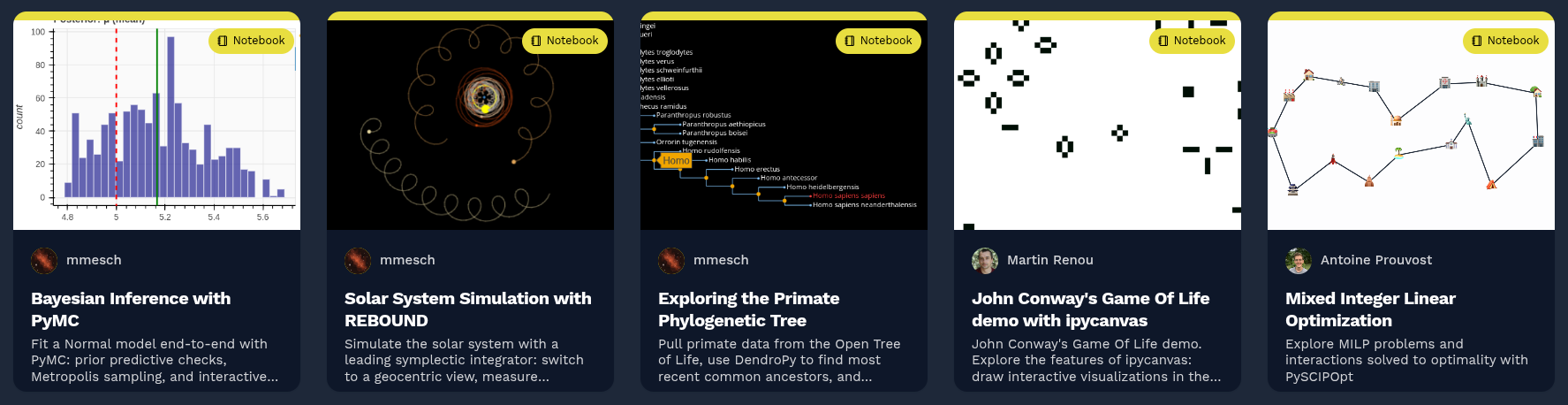
<p align="center"></p><p><a href="https://notebook.link/public-link" target="_blank" rel="noopener noreferrer"><img decoding="async" loading="lazy" alt="A row of examples from the notebook.link gallery — Bayesian inference, orbital mechanics, phylogenetic trees, Conway&amp;#39;s Game of Life, mixed-integer optimization and much more" src="https://notebook.link/blog/assets/images/notebook-link-gallery-dbf85ab0a85d8c73e8ff24fe3a6c0171.png" width="1775" height="458" class="img_ev3q"></a>
<em>Fig above: A few examples from the notebook.link gallery — Bayesian
inference, orbital mechanics, phylogenetic trees, Conway's Game of Life, and
mixed-integer optimization, all written, shared and running fully in the browser. <a href="https://notebook.link/public-link" target="_blank" rel="noopener noreferrer">Try them yourself</a>!</em></p><p></p>
<h2 class="anchor anchorWithStickyNavbar_LWe7" id="where-it-fits"><strong>Where it fits</strong><a href="https://notebook.link/blog/what-is-browser-native-scientific-computing#where-it-fits" class="hash-link" aria-label="Direct link to where-it-fits" title="Direct link to where-it-fits">​</a></h2>
<p>Today, browser-native compute is often the right default for teaching and
workshops, runnable documentation, interactive blog posts or tutorials, sharing
quick analyses with a colleague, and exploratory data analysis on
small-to-medium datasets. Community libraries increasingly attach JupyterLite
or notebook.link badges to their own documentation example galleries as well,
letting readers execute code directly next to it.</p>
<p>For workloads that genuinely need the full spectrum of what is possible on
one's own machine or remote hardware — large simulations, model training,
multi-core parallelism, GPU acceleration — browser-native compute alone is not
the right tool. But the two models are complementary rather than competing:
browser-native environments can serve as a lightweight front door to backend
compute when heavier work is needed, and platforms like notebook.link can
seamlessly switch between WASM and backend kernels as needed.</p>
<hr>
<p><em>Notebook.link is a scientific computing platform with multilingual
browser-native support built by QuantStack, contributors to JupyterLab, Mamba,
JupyterLite, and Emscripten-Forge. Try it at
<a href="https://notebook.link/" target="_blank" rel="noopener noreferrer">notebook.link</a>.</em></p>]]></content>
        <author>
            <name>Matthias Meschede</name>
            <uri>https://notebook.link/@mmesch</uri>
        </author>
        <category label="jupyter" term="jupyter"/>
        <category label="jupyterlite" term="jupyterlite"/>
        <category label="webassembly" term="webassembly"/>
        <category label="python" term="python"/>
        <category label="scientific-computing" term="scientific-computing"/>
    </entry>
    <entry>
        <title type="html"><![CDATA[Introducing Notebook.link]]></title>
        <id>https://notebook.link/blog/introducing-notebook-link</id>
        <link href="https://notebook.link/blog/introducing-notebook-link"/>
        <updated>2026-05-11T00:00:00.000Z</updated>
        <summary type="html"><![CDATA[An introduction to notebook.link]]></summary>
        <content type="html"><![CDATA[<h2 class="anchor anchorWithStickyNavbar_LWe7" id="reimagining-how-you-share-collaborate-and-run-jupyter-notebooks---all-in-your-browser">Reimagining how you share, collaborate, and run Jupyter notebooks - all in your browser.<a href="https://notebook.link/blog/introducing-notebook-link#reimagining-how-you-share-collaborate-and-run-jupyter-notebooks---all-in-your-browser" class="hash-link" aria-label="Direct link to Reimagining how you share, collaborate, and run Jupyter notebooks - all in your browser." title="Direct link to Reimagining how you share, collaborate, and run Jupyter notebooks - all in your browser.">​</a></h2>
<p align="center"></p><p><img decoding="async" loading="lazy" alt="Rocket" src="https://notebook.link/blog/assets/images/rocket-3de35d5c159d9b3f0f1b32990be05aac.png" width="720" height="436" class="img_ev3q"></p><p></p>
<p>Sharing a Jupyter notebook has always been harder than it should be. You clone a repo, fight the environment, install conflicting dependencies, and hope the author didn't forget to pin their package versions. Half the time, you give up before the kernel even starts.
Notebook.link fixes this. Open a link. Your notebook runs. That's it.</p>
<p>Built on JupyterLite, Notebook.link is more than just a notebook viewer: it’s a fully interactive, scalable, and language-agnostic computing environment that operates entirely in your browser. Whether you’re a data scientist, educator, researcher, or developer, Notebook.link eliminates the need for local installations or complex setups, allowing you to create, share, and execute notebooks effortlessly.</p>
<h2 class="anchor anchorWithStickyNavbar_LWe7" id="why-notebooklink">Why Notebook.link?<a href="https://notebook.link/blog/introducing-notebook-link#why-notebooklink" class="hash-link" aria-label="Direct link to Why Notebook.link?" title="Direct link to Why Notebook.link?">​</a></h2>
<h3 class="anchor anchorWithStickyNavbar_LWe7" id="1-lightweight-fast-and-accessible">1. Lightweight, Fast, and Accessible<a href="https://notebook.link/blog/introducing-notebook-link#1-lightweight-fast-and-accessible" class="hash-link" aria-label="Direct link to 1. Lightweight, Fast, and Accessible" title="Direct link to 1. Lightweight, Fast, and Accessible">​</a></h3>
<p>Notebook.link delivers instant access to notebooks, no server setup, software installation or configuration required. Simply follow a link and start working.</p>
<p>Notebook.link is powered by JupyterLite, a distribution of Jupyter running entirely in the Web browser, including language kernels and terminals. Unlike traditional JupyterLite deployments, your content is persistently stored in the cloud, enabling long-term projects without losing progress.</p>
<h3 class="anchor anchorWithStickyNavbar_LWe7" id="2-scalable-and-powered-by-webassembly">2. Scalable and Powered by WebAssembly<a href="https://notebook.link/blog/introducing-notebook-link#2-scalable-and-powered-by-webassembly" class="hash-link" aria-label="Direct link to 2. Scalable and Powered by WebAssembly" title="Direct link to 2. Scalable and Powered by WebAssembly">​</a></h3>
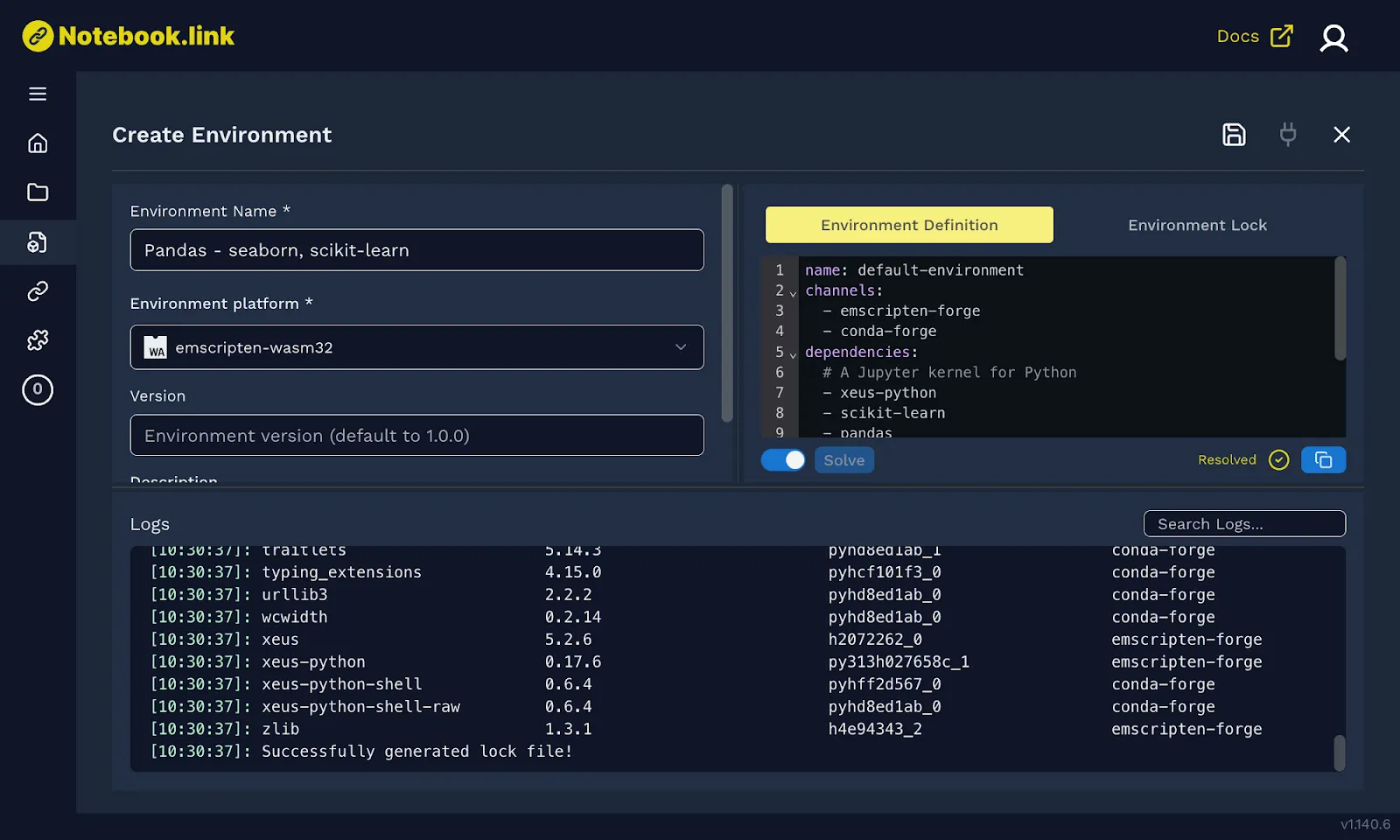
<p>Under the hood, Notebook.link leverages emscripten-forge, a WebAssembly software distribution built on the conda ecosystem (using mamba and rattler), and hosted on prefix.dev. This brings the full power of scientific computing to your browser, supporting Python, R, GNU Octave, and C++, all in one unified environment.</p>
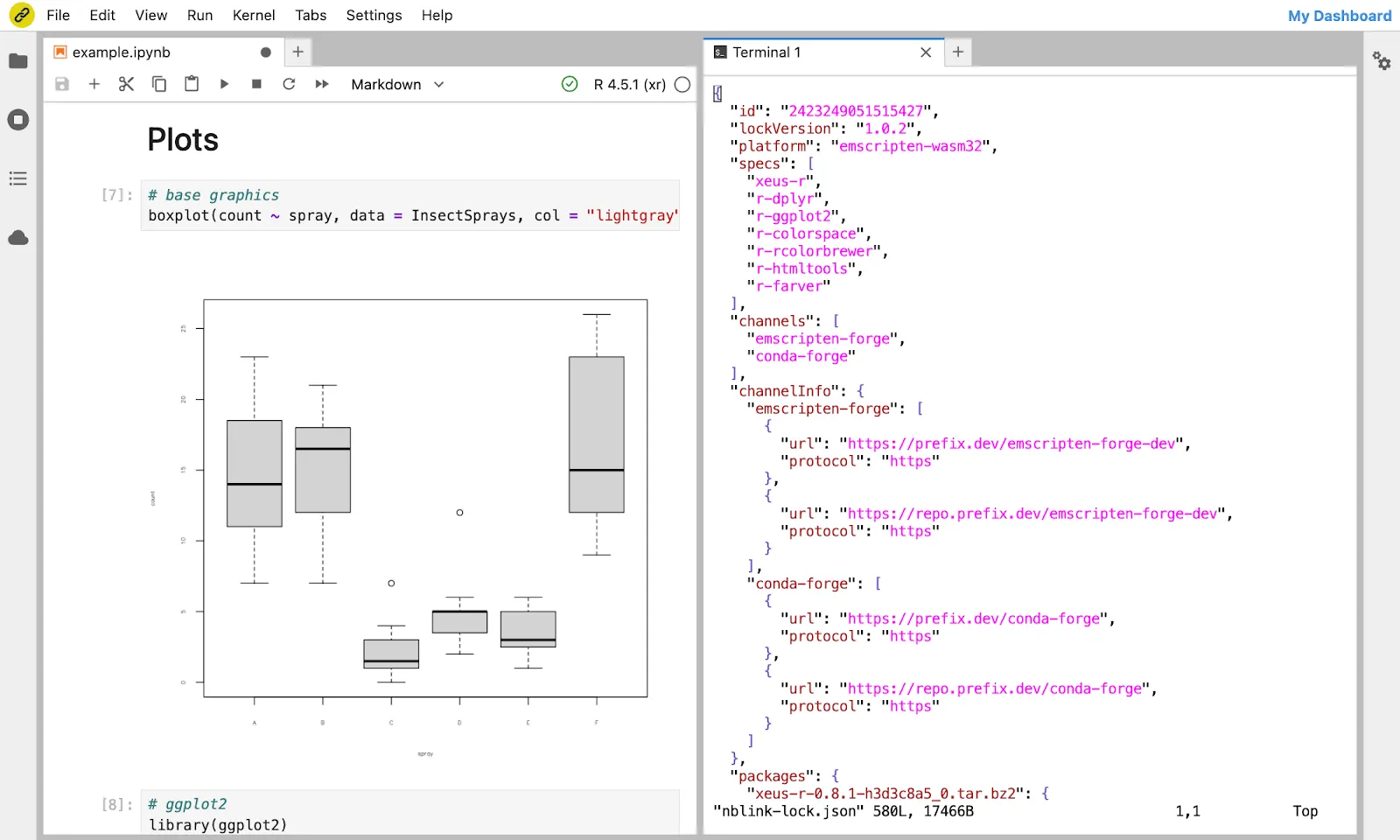
<p><img decoding="async" loading="lazy" alt="Create-environment" src="https://notebook.link/blog/assets/images/create-environment-7562e1fabbdd5f9d7f30d395b672f33d.png" width="1600" height="960" class="img_ev3q"></p>
<p>Our distribution extends beyond the Python programming language, with support for R, GNU Octave, C++, as well as console applications, making it a unified solution for the entire scientific computing community.</p>
<h3 class="anchor anchorWithStickyNavbar_LWe7" id="3-multi-language-support">3. Multi-Language Support<a href="https://notebook.link/blog/introducing-notebook-link#3-multi-language-support" class="hash-link" aria-label="Direct link to 3. Multi-Language Support" title="Direct link to 3. Multi-Language Support">​</a></h3>
<p>Thanks to the xeus kernel ecosystem, you can write and execute code in your preferred language, all within a single platform:</p>
<p>Python (via xeus-python)
R (via xeus-r)
C++ (via xeus-cpp)
GNU Octave (via xeus-octave)
Write, test, and share code in your preferred language, all within a single platform.</p>
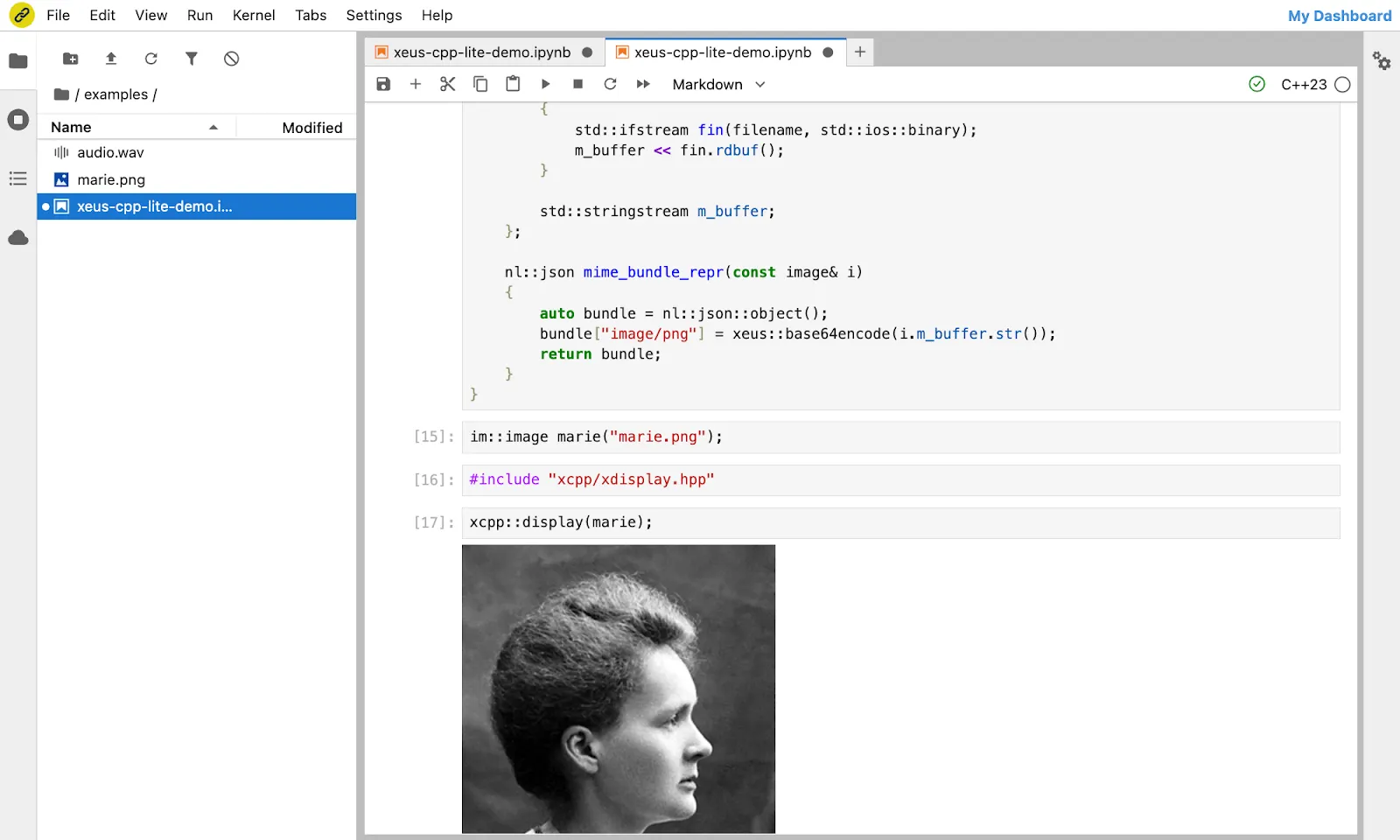
<p><img decoding="async" loading="lazy" alt="xeus-cpp" src="https://notebook.link/blog/assets/images/xeus-cpp-43a9cf5d41050860b353759b42a65dee.png" width="1600" height="960" class="img_ev3q"></p>
<p>Therefore, the scope of emscripten-forge and Notebook.link expands beyond that of Pyodide (Python) or WebR (R). It is a consolidated software distribution for WebAssembly addressing the whole scientific computing community.</p>
<h3 class="anchor anchorWithStickyNavbar_LWe7" id="4-a-fully-fledged-in-browser-terminal-experience">4. A Fully-fledged in-Browser Terminal Experience<a href="https://notebook.link/blog/introducing-notebook-link#4-a-fully-fledged-in-browser-terminal-experience" class="hash-link" aria-label="Direct link to 4. A Fully-fledged in-Browser Terminal Experience" title="Direct link to 4. A Fully-fledged in-Browser Terminal Experience">​</a></h3>
<p>Need to run shell commands? Notebook.link includes an in-browser terminal that emulates bash, complete with WebAssembly builds of essential Unix commands like sed, grep, cat, and even vim and nano, bringing the essential developer tools to your Web browser.</p>
<p><img decoding="async" loading="lazy" alt="R-notebook" src="https://notebook.link/blog/assets/images/R-notebook-c85c2de1397999dea531b754b6e77a4a.png" width="1600" height="960" class="img_ev3q"></p>
<p>We are not stopping here. Soon, you’ll be able to clone, commit, and push directly from the browser, making collaboration even smoother.</p>
<h3 class="anchor anchorWithStickyNavbar_LWe7" id="5-permalinks-for-seamless-sharing">5. Permalinks for Seamless Sharing<a href="https://notebook.link/blog/introducing-notebook-link#5-permalinks-for-seamless-sharing" class="hash-link" aria-label="Direct link to 5. Permalinks for Seamless Sharing" title="Direct link to 5. Permalinks for Seamless Sharing">​</a></h3>
<p>You can generate permalinks for any notebook, whether created on Notebook.link or hosted on GitHub. Say goodbye to “it works on my machine” issues. Share a permanent link, and anyone can run your notebook instantly.</p>
<p>Multiple sharing options are available:</p>
<p>Links to a full JupyterLab UI, with a tiled layout and all the advanced features of the JupyterLab environment.
Links to a single-document view, providing a full-page Jupyter notebook interface.
Links to a presentation view, turning notebooks into blog posts by removing distracting UI elements.
You can explore the following demos:</p>
<h4 class="anchor anchorWithStickyNavbar_LWe7" id="r-language-demo">R language demo<a href="https://notebook.link/blog/introducing-notebook-link#r-language-demo" class="hash-link" aria-label="Direct link to R language demo" title="Direct link to R language demo">​</a></h4>
<p align="center"></p><p><img decoding="async" loading="lazy" alt="R-lite" src="data:image/png;base64,UklGRtoLAABXRUJQVlA4WAoAAAAMAAAAiAEAeQAAVlA4IBYKAAAQQgCdASqJAXoAPnU2l0ikoqIhJBFLeJAOiWdu4WxcAaIufCb3lFoek8X+Q71V7ZnzAedF6KN5t9ADpf8g79F9qWQnZr9tMwuGay7Fy88V4Cv3AjqC8WWAs//nZTsgnTaiVN1Z5xWmRFXI3QLjf9+Y9AprI6gQgviJUOgQXGaDfyVb/8OM1olwWYaQPEQuogdSFLJLtE5MRZ05SVGqfwFVwBFqOo3unliMDJssR1diaEnv7ekzpyqofKcimzTcj7yjli+PeAuT1UUDjbtxxMD4p3dr1OJBJpkb15iGQQYJrXxEqGFxJA8HMWM87F6LoiDTCMaVhkjdedrR46lUqGeXEoeXVs/L8yq1HH4DKtKAAQDeCDhbd7Ks0UIwRr3S0EzQ+mF4E7OuQenbJuVXHgBb0AbmhFsCMGiJbVLjl1vzzyap8uBw2b/47uip/BZt9L3WjqWdltKYMmVxR2UFvY9tYj6p5BJYJEzBmIKxdzFdv0+NB5Yj45zVvMLpylKOjmvpU1gzdy2VJ2kgaunZO/HgURO1vgUB/sMEYK8UTYtfBx0nFUrZvtE/47B6rD9JwlKy5J2Ybypi2GDpnZcBfbRZbucwDVGXubkoNCs8KiWF/ru6wTFn34qz2dBRGv2yErlbzaE7tUiWGJvyS6RE6yjKOIKB5fAkS3nn0vkc6wUx3PNTpko1LxfESoIWaVb52Mb8Zys2MHkNeQAA/v7Mn/AIPsS/4fqQuJEasjLfNdZdoDtc2CNPoOiWCW12tgWhjdRLRLpHK+BScyfEBVcHs6GWbfiav8kTjIa7aqEkKQGMdgSdtam+cad+DS3Xzl9uRwspPJQBzCsrc8HSKI48tLG8kDiWiqHCalkMkjT+NpTGXFDjTGFZzitbrWvz/DOUM/vpQQaLNd+Ely5Ho9m25aBYgs2ZmIFtjGOvrJhRnBS1jVcHJxlpdS0p7WuQBzmKvlISvbz8R8BZZYDqPSm8LG6VX66ZVrNyjV/UYAGybSHwO6gD6ZM1LnfYnRahZ0e2l+Bv6ij471/1daXZhgk8Cpev30vMlTQubgoFDnNailgC0SrMQ8rfSGQsAHi4gBNF/VgYfO9ZGqPuX3MqygoO2qJHHU1PJHqYapwDZv5iP4ISNpm7fVN3v9CHE8c1Dkj4ITMAdQPJYrXyoDZYuI1LxQYsskp6SiCs1cQsBlG9mZIz0y/410N1JiribjdK3fOaW+3tb459tcT7Bfn//Wosf96XCp8RjL+Nzx/y/j/k3O1bF+P4GMkV2mFAVUDel/N3ryWdERr5Y8fgTobHYnSjXm42sfobeDvBzydPsGE38g6IeQsuSCpR60jeUs4y2V5/DwhG4y923ob+8t0Fbq2YyndR/t2EhAbiWceMW92mSlqI+EzMe00WoEHWmUfldp9BQGFmDavrhWMYGBp3sZDSzfvXodBM8jhnGHVv/N4AMpF4xRUT0rf/AfkrvB4cbgJeS7MkgAllLAGrfxwf//KGByTjy38MxjDi5BGDTmAtfmWM10Xd/cHz75fxrXKefn4bAVMtVulwNZEsfha8Ac43jL8inI9bS5eE2v+D7hUFpteJod+VgoYFpsvWr1rM/HeXTCnO9m3ufdCgPeQC1EoJDMPaC0i0ho4SUEXH1+XeT0RmsrpS4VS1701R4ec2vuvvrLvjRe31Ulp3WhRuXdYXyy/6KUA92CEB5kz7lJC1ifW12KEpy2SEIh8+oaly7SP8muVmDhMHRQn7tmrDsjgBzUyEdRzffUT2rmkn3dUzF1KchG6+fr7Wze57g+vaJTxUVdTK4zDYRUWDI3i6pQyx9sqFbitClO8cINOeaRNFOgfUSq70QYa8o7bffsMTag1Jou3XWSscRc5irAoDrb33zPiU7eYRjQEe8i28W327LX93jh3ZVDqDYoOKOjRkSi/kmunfxPvE2N7SgNb3jAX6p7hCwhhKkkB6gmfJki954dQQpbsZZRdDyQ9FNd3ZDgfhWLgFR7sdsNhZSNxPSWGKgshRHhNyiC/dDTMMqFsg/oUsB1oS17loc/Zlw9px/4DWHYVG4d1laoOz3+y7DL6BftT5Zr3p/whgS8vqB8JEmpAAXirvnZq2p3Rcttjwu7H6Dd4X4iYAabpycAjam4TGQJRDxPivlyEIJ9HEAKRBtO/EOQ09ZGnWpxA2SyQwSX+Q0CgbkoVdJ5eDdLUW7FGtGfVOs15opejBVGrCZu3QQlpwl4OldGBz6gQHnyJY+fNY1Fvk7CBj4/8UEHG8gEmuNtGn0mHX5uiCfKNobpPKk12aUPkq9+1z7oi2gAbqdR2Q6Llrpxkv7W+QA/EJT7iAS1QVHdsaXVyFTwcQ/WwW/4czZq8fkuKo3QQDZY+COpdOAjkZ6ijtvfSepXZykF/bYgBFUw1QT3al3HuZUL3jp0DflfKwzQ0heHr9My9UQmgdLZq4XF+geedRDETm6xvw+nULa5bcLyzDTHO0FqT8U5L/Fq41J93FJoc7Vl98qSQDqi0t09Wdc7WOAK+VVMRRE36MicUDoclXhYdsiZOvBmyrHNIhhPvyln26WlH7sT5BC93BHaw9pOqG3lw2FoRYnvUerLxlP6rIoedeIwc6op9CyW+g6+sa9e7hn1HZccKr0QXx7CVZp05ATiyudfjoet3Eqi80KSSSi0yOm1KCCR0mCOfDZqgwcqGo9TZDWVp5dnP8hVDQMMuffPcPvEQGIouFVqN2nS08noMvdrRA8Rc+nj0g4ahuVbMl77+8oyyDtvcZnK9MkKUGQectPZ0wtHQQDif7tV54sWP6g5xHjIV0Pr/PNRvzfPExE/NPVm/WOo2B4hIP8K2uElsFRvQJdNrAiT31ZBQ/+vBemYfSZyLavkHl1awNTbMzC8rHQT8iQwrat3H/M8Rkl21KFgVF3kxkemczETE6d1/dSdF6hzJokGT6+UmJrPJqD7vW2OzZz7iQicqs9Yf3uouwLj7y1p6isth112L4/C/P7X2bEgw8rCzlTaCQrbqqcXr+BfWxuKKGpoBlVUJcqInLrwgdUZJdZq1/M8TsF7yIw+dYT9lm3+lNXr6GZ0EgoNwlmbVbjT/WvEeJI+awTLdoU6fIekqDoXJWJthfDj6YSwU61Pjo4LGnH7HLL/C9spU10IHDCddg4mBg4SR9mIw40Ex1TJJMol6awf4wIMIO8N2m2HHGQNDjddYmY1jpfBe34yCGKlez06bSzt3zDiKlWiEx413uhnXIboo8uJ7CB7r8fTYn0lnB3baqWWGf7mS+5v65X4GNr8o4hvDs4GmbpEFvzHbnmPhi2SbLanAc2Af1UcKtRC2BYFA5cnJdBqjQOTAFd4KX+PwyEcYqH8m9X59DaL/wKtRHcw3K0+hzPl2q5/sIDO/2FKfJ4vwIaATrInJulUnNWY0Oo10X51QRpu48MCb/Cpiaa+q/J+09hSvH8fZjFOOCGNcAAEVYSUa6AAAARXhpZgAASUkqAAgAAAAGABIBAwABAAAAAQAAABoBBQABAAAAVgAAABsBBQABAAAAXgAAACgBAwABAAAAAgAAABMCAwABAAAAAQAAAGmHBAABAAAAZgAAAAAAAABIAAAAAQAAAEgAAAABAAAABgAAkAcABAAAADAyMTABkQcABAAAAAECAwAAoAcABAAAADAxMDABoAMAAQAAAP//AAACoAQAAQAAAIkBAAADoAQAAQAAAHoAAAAAAAAAWE1QINsAAAA8P3hwYWNrZXQgYmVnaW49IiIgaWQ9Ilc1TTBNcENlaGlIenJlU3pOVGN6a2M5ZCI/Pgo8eDp4bXBtZXRhIHhtbG5zOng9ImFkb2JlOm5zOm1ldGEvIiB4OnhtcHRrPSJHbyBYTVAgU0RLIDEuMCI+PHJkZjpSREYgeG1sbnM6cmRmPSJodHRwOi8vd3d3LnczLm9yZy8xOTk5LzAyLzIyLXJkZi1zeW50YXgtbnMjIj48L3JkZjpSREY+PC94OnhtcG1ldGE+Cjw/eHBhY2tldCBlbmQ9InciPz4A" width="393" height="122" class="img_ev3q"></p><p></p>
<p><a href="https://notebook.link/@quantstack/R-kernel" target="_blank" rel="noopener noreferrer">Experience R in a Jupyter environment</a> using the xeus-r kernel, running entirely in your browser.</p>
<h4 class="anchor anchorWithStickyNavbar_LWe7" id="jupyter-games">Jupyter Games<a href="https://notebook.link/blog/introducing-notebook-link#jupyter-games" class="hash-link" aria-label="Direct link to Jupyter Games" title="Direct link to Jupyter Games">​</a></h4>
<p align="center"></p><p><img decoding="async" loading="lazy" alt="jupyter-games" src="https://notebook.link/blog/assets/images/jupyter-games-7669e67004fa047479bf0d6d1c35b2a1.png" width="352" height="140" class="img_ev3q"></p><p></p>
<p><a href="https://notebook.link/@DerThorsten/jupyter-games-blogpost" target="_blank" rel="noopener noreferrer">Tiny games and simulations built using Box2D</a> and its Python bindings, pybox2d, and rendered with ipycanvas, utilising the presentation view.</p>
<h4 class="anchor anchorWithStickyNavbar_LWe7" id="in-browser-c-development">In-browser C++ development<a href="https://notebook.link/blog/introducing-notebook-link#in-browser-c-development" class="hash-link" aria-label="Direct link to In-browser C++ development" title="Direct link to In-browser C++ development">​</a></h4>
<p align="center"></p><p><img decoding="async" loading="lazy" alt="cpp-logo" src="data:image/png;base64,UklGRu4MAABXRUJQVlA4WAoAAAAcAAAAewAAiwAAQUxQSFwDAAABkEPb1vIoL2vctRockqCZ1mqtrbfOZyrc3V1qh2q81ArvRiqkcocwsvJ938Mi//e/u37oIgKCG0mKpIiDpdJyDP2A3DOwf/KdMe8m9wcIzpLrhqM015dhkbEjzDEN78wAouE5x/VFAwqhcU7IiVIEii5rTlB9pUg6yV2f2YGfu5JFUz3NDp2plot/gC04GJBJzrFFtuLS8Rx5+JpfszVft/iEUf6Irfq4XFa42bo3lkkh/Xe4LSkx7w3P2CWfNwoI9xi76HjIXQovK7akwLwndX5i1/3UlexeuC0pMe/+fhbjgN822b/DLchFy3lvfsXCfN3ss0bZIxboo3Jr4Rbq9WU2wv2dxfp9Z7pD6p+xaJ81OGHLGIt3POQk3ACqK4WuhltC3pPiUjXNQE5Xx2ZdP4M5sC4GfQsM50JfFOcY0nN/0c6gtv8muIDKQpBoEPXXRAZpE+pvRDNvOoKJUvzbw48Q0cr8vS6xhHgnJnpTGfJOfgt7J1EiT/G/8ZT26jvx5CkFPKWRT2ngKc1ePGX0v/UpNsaLT2ntxctJo7x5hSgCvYT25qn/6DuJaOgpowx0uLUy0HeiFPb3OaJBl5MxhqC/z0phl0RpjG1ZzBNaGeA1JmXloRmG1mCfMB5/gqHVnj6kwYfgT0B/SI0rJyIad8NBKZTlPTPA2o9R2uIDRFrso6xv6oj9O8G5D4CtG6OMpSm5Q85OYZ1YSPhoCsR9LNxH3Bloot7Z+wfjH7xCGjoYNHG2X6GGTJDuoe57Neoe0ZofDOqPNUTUgkoL/XE/Jgfob1vDeITbKNqSG2jcXEYxLX+CxJNyimvzWxTetlAi5hxfQmDpRA4lqH9IPsN+cmD1rGzmasiZSd2f5fKlJ5kcW3hV6MLUXC0iK4YmJTIVIms2vJDGy0ayafouUXkP704ny5bclMOtZWRJiXl/WkEu2SIg729byT1zTric96WTOWRJiXkfDpDr1sy6xWwtSTCp57MbfO5JJiEWXrOed32tiCwpMe9TpSTMxhcWw91E8kzfbSnv4T0ZJNJlN62EezmJteKJ43BXkmR9rW8chbvNR8LNObmYcLhP5RCAgaEEwx0kEGsTyPtsHeGYHC/vn3uTCcqiqyrGbpNrxQTnsq2jc0tLc6NbXSwJAVZQOCDGBwAA0CMAnQEqfACMAD51MJRGJKMiISz0bQCQDolmCHABgCY1tnzS/EclpyT0w9Emg2wh+m/uO/PHsAfpX0p/MH+4XrkeiP/Z+oB/kOok9ADpS/7hkr3iD++fjJ4If52yP/eOIpaw3ZTlvCVpAppfjlzZur8k+zMOpTCRtJirUw2XbMo4HVfsihBwRJ2z19PD34HNP/vJ0SDebMtcE/vNcBV+8Z3rB+k9DEOJEv+dRvTmkuPV7/zMQkqrMsZIuGHk52HPBImR1XRBjUlLLWFy6UvOKBRsO29zG7hLpYsAFpc7IGJlgr1BDV6BHJyhp9OTwQPtigjWNYDKvr0LaOktL0Xs9m+h0Z5cUKyoOJiUZaK3eS2V/p4nqOUy0PFOFG6LUAyNZPIX2oY8+AD+1cnz7XGcPBpcin1JdDSLw81lq4k9WXAbDayftJ5OP4rb5SI+/dLXJxLbmQAt6gQk9mD/tYzoB45tnJO3jKZfAWajxAeM5TSsLR//9gZD/EsiC0Wkd4XDjKVVclR77H/2e4d2aQAQKgDmD7utaRRh4Lklqy6oEFiOlFYmnkDSJY9cpRPZLeHpaHivGZw1JxK52CxKKQeIfA691V1nmva4WvloJkAteIJ2rfzbi+RaG9ZU6mjB6aZOTEiGIwQ27/1DyB3yblkz+/9mshCQnkQXzQhIxjhLQMnwU2UDcVqA+CvdW8csddYE8W6tgfzbUZHFe0nKpu5tOCMl2x2drA0ud93uD+WnkAQfoLa1eme0jw7H671b7N8E6he7VNJE01IS+d1a9Vyk4XNzapuFcjgsbueOdI1LyTw30epkqm48CJOpg3wO0xXBkJxp/OcFKvLchzOGJNQcR2YjO6io0LkQvSL1BZp1+9YsReqO8V+i2SoUnoycqmYcG3bn4Zd6ziaQRBoGIVH5z9O2OCQj1jttSIOJx8NjbpKRqm/ip8q8RERasvVc3mNBxt46/gsCMMXr8g8q0ELHv69+Q7/XasdyejwLNSxhH41Re1jD9FI6UGMn23dZCNH+wxH87ZGuhQLXXxKgJU62u3Kg1GOwpyHlW/TF8uoxp1o6klSZ9UQeDUjle/EgooKx5W9IeVbqImmxK//6UWvaNF7oiRSFhLMAJO6WN2CblZvVn3YVVAkM7R1UooEe7YBdCgo/C3ckI1iXxe/96/xgIDL7PnpWFlXi4xKFpevuYkug9ybkRU8r2P3xOLqjEtcCYoSYj/JNIQopfSQXF7WV0b6GeL/n3X+AOBUPm2IZNadb5DfA3crueUCNaQjUygumApnzwOdv58+dZk7jJfjy6ZceaeJg6cbwcNSzuUddsn13yD3MDcCCN1KiTlf4w0BAILOBX2cpu7D/rZGkaczz88YJwwoTYk2jhjMJ2MRREKhm6iaT+7zHdw5B6qDpiFo0BUuCOSnKw2ALHrIPLurVp+PnnoxiP7p011dJ06f6y/fjXzZTezm3TKcygTqxn0X4vR6UIYtoVdsfmx2Z//P5i1O/iRdrFW4BBVCloei8xe38hwy16WYKJT1n17xIpgT90pmaUpNQybSSZhTpp5qeEE/3jRLI1mHxDV3y8Tnbjgo8nF2BoFHxEQKExCCj/h3Wu8AOewxalza82qqi4pu7odqsqwigJuroBPiqszX9EwDdduSf025qrdLNlFWsbSq4JR9P79tLD4fp9AvPSdkPLN1eOebBH5GG/iqi1Fc5exrVr1dCFeRfVH6qdhbrpQzWU4r2YL5kvJi4VUedhVfFJhhd3XZDx2nJy+OG+uo6DFdZGkHlkeAczeVJAjAVPasSmJltzbbfLqZpb+oMj/be2faxkmBUm7Fr4YlX1HSXheTC4bsFrJJfnqNk4uLe1UiHDs28t5tF1P9vG0EWG42MxqQ9f1XVTt49zwy9hK6YaJ3J6TWRjhSqDHGM0pu9zpma8HjiWJYIuEmZ+OiRsIRlPBBq3KN3AO+GTBnFX6+eme+6r/F7xCou0gRk/NqkA37lufTaeD66a1qM3GRL0/XH6f9Zddhb4le5Ks/RNE3dJM/313fsvXwLfX/qDTIxm8+xxUsPsF2TNAQDM2Bj3VGdxM6HrLhsyFbWWfYb6ZVtYndyIveAPQpEbhdd7wVegIKBT30jkWEX2NIxwdnG+VieV8h4CU7WosFSDujl5JIW69b2udGbCsFC/Ea/MydpfaZKLYDXReHvU0KdLyQg2nZNGL1r7WY9VH8JRvzYiXFa/9f9q6QwM54RCH7wLSsZQY54L5H47I25cfHIQssS2HL2WIGOeAjqOAXwSrM/avdKnPFdPKV/amvee5BaLou2ui8k59TsIbDmW9lvPBPK7wDhylG4H3DEet/F/YDXFI6lpEbN/WMoPYpmY1uiODi9O0sBIs95W1HF3ZojpOuonPK7WsNcCIIECXhOFzzWshalw+qFZkmj/Jz8cvg39LSR8FFwRG9DgComasWjN+tETlbFLXi0fxuNfUFe7codjuWXAAAAg+tCz9zDuaTfcLM2j1WI5HOJVDvHXsjfW2llf4nplKjl08lMPBa1rp+omDjYFjfv0LU5oStuR23uQGIA1W72RiT7Wnz/lZyAsL1DV+fBN9PUvOF5w5WvAgtOWa5trcFHCXnABPFTERmU8xjVBFj7wLUJU+oHTBWgf0ZYrT4WutAAAAAAAEVYSUa6AAAARXhpZgAASUkqAAgAAAAGABIBAwABAAAAAQAAABoBBQABAAAAVgAAABsBBQABAAAAXgAAACgBAwABAAAAAgAAABMCAwABAAAAAQAAAGmHBAABAAAAZgAAAAAAAABIAAAAAQAAAEgAAAABAAAABgAAkAcABAAAADAyMTABkQcABAAAAAECAwAAoAcABAAAADAxMDABoAMAAQAAAP//AAACoAQAAQAAAHwAAAADoAQAAQAAAIwAAAAAAAAAWE1QINsAAAA8P3hwYWNrZXQgYmVnaW49IiIgaWQ9Ilc1TTBNcENlaGlIenJlU3pOVGN6a2M5ZCI/Pgo8eDp4bXBtZXRhIHhtbG5zOng9ImFkb2JlOm5zOm1ldGEvIiB4OnhtcHRrPSJHbyBYTVAgU0RLIDEuMCI+PHJkZjpSREYgeG1sbnM6cmRmPSJodHRwOi8vd3d3LnczLm9yZy8xOTk5LzAyLzIyLXJkZi1zeW50YXgtbnMjIj48L3JkZjpSREY+PC94OnhtcG1ldGE+Cjw/eHBhY2tldCBlbmQ9InciPz4A" width="124" height="140" class="img_ev3q"></p><p></p>
<p><a href="https://notebook.link/@quantstack/xeus-cpp" target="_blank" rel="noopener noreferrer">Discover the capabilities of the C++ Jupyter kernel</a>, including rich display and interactive help. Write and execute C++ directly in your browser.</p>
<h3 class="anchor anchorWithStickyNavbar_LWe7" id="6-an-ai-assistant-for-notebooklink">6. An AI Assistant for Notebook.link<a href="https://notebook.link/blog/introducing-notebook-link#6-an-ai-assistant-for-notebooklink" class="hash-link" aria-label="Direct link to 6. An AI Assistant for Notebook.link" title="Direct link to 6. An AI Assistant for Notebook.link">​</a></h3>
<p>Enhance your workflow with JupyterLite-AI, an integrated AI assistant compatible with most LLM providers. Import your API key and enjoy an augmented development experience with features like in-browser tool calling — which are based on the JupyterLab.</p>
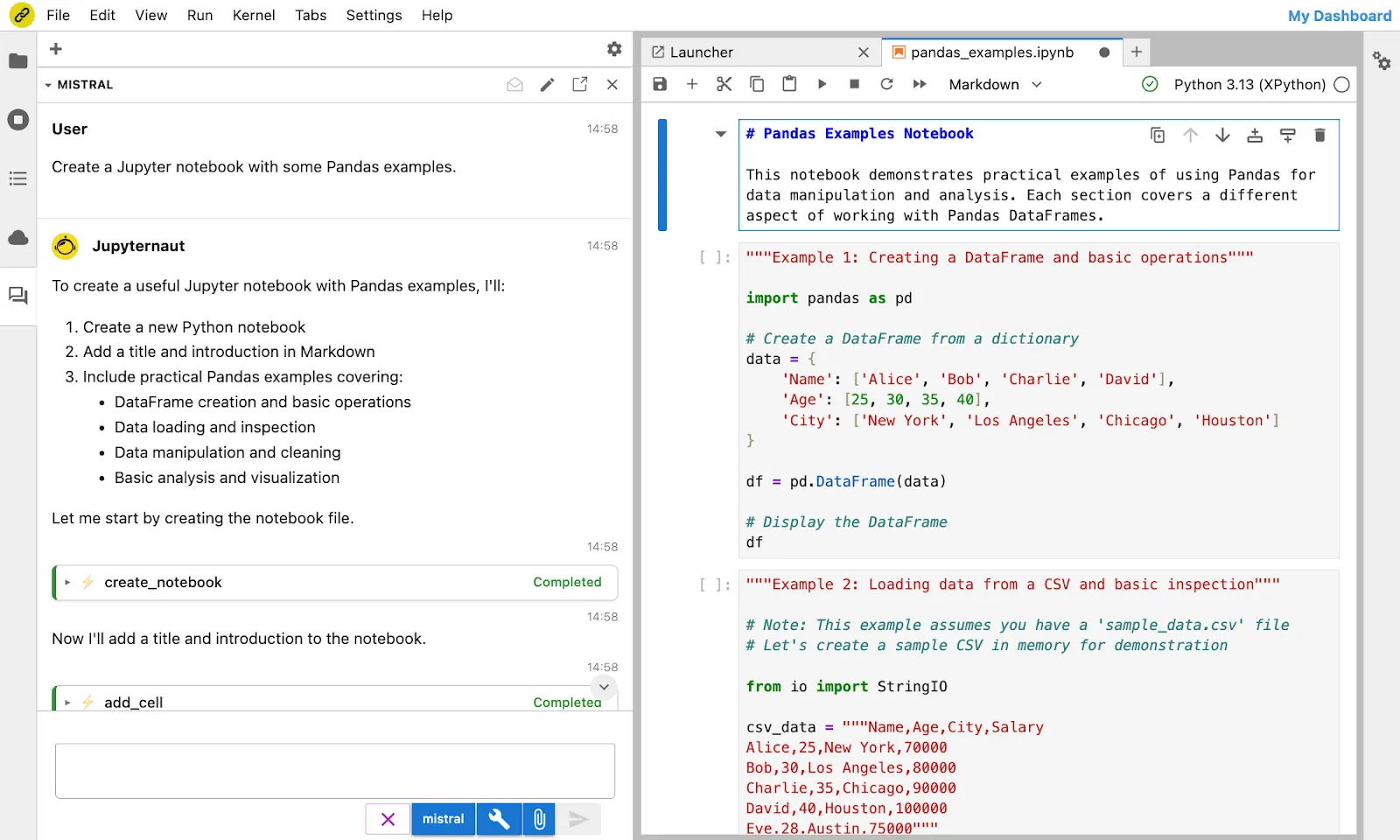
<p><img decoding="async" loading="lazy" alt="jupyterlite-AI" src="https://notebook.link/blog/assets/images/jupyterlite-AI-8f7869dc59f3d88740373932e3a03a82.png" width="1600" height="960" class="img_ev3q"></p>
<p>The JupyterLite-AI interface, powered by Mistral AI’s Devstral model.</p>
<h2 class="anchor anchorWithStickyNavbar_LWe7" id="custom-deployments-for-institutions">Custom Deployments for Institutions<a href="https://notebook.link/blog/introducing-notebook-link#custom-deployments-for-institutions" class="hash-link" aria-label="Direct link to Custom Deployments for Institutions" title="Direct link to Custom Deployments for Institutions">​</a></h2>
<p>We offer tailored deployments for universities, research labs, and enterprises. Host your own instance of Notebook.link, supporting both WebAssembly-based and classical Jupyter kernels, for seamless integration with existing workflows.</p>
<p>Unlike traditional JupyterHub deployments, where users wait for the environment to initialize, Notebook.link delivers an instant, interactive UI. Users can explore notebooks, browse files, and start working immediately, even while the kernel environment finalizes setup. This setup, based on the Jupyverse project, creates a frictionless experience for collaborators.</p>
<p>Interested in a custom deployment? Contact us at <a href="mailto:notebook@quantstack.net" target="_blank" rel="noopener noreferrer">notebook@quantstack.net</a> for inquiries and pricing.</p>
<h2 class="anchor anchorWithStickyNavbar_LWe7" id="a-long-term-commitment-to-open-source">A Long-Term Commitment to Open-Source<a href="https://notebook.link/blog/introducing-notebook-link#a-long-term-commitment-to-open-source" class="hash-link" aria-label="Direct link to A Long-Term Commitment to Open-Source" title="Direct link to A Long-Term Commitment to Open-Source">​</a></h2>
<p>Notebook.link stands on the shoulders of open-source giants, built upon the foundational work of the Jupyter community.</p>
<p>For over a decade, QuantStack has been a dedicated advocate and contributor to this ecosystem. Our commitment remains unwavering: we will continue to support and advance open-source innovation, just as we have done for years.</p>
<p>Our team includes more than 10 full-time contributors to the Jupyter project and ecosystem, and we actively maintain and enhance other critical components of the scientific computing ecosystem, such as Apache Arrow, conda-forge, mamba, and Xtensor.</p>
<p>At the heart of Notebook.link is JupyterLite, a cornerstone technology developed by QuantStack since 2021 and recently transferred to Jupyter governance. We are proud to uphold our tradition of leadership and collaboration, ensuring the continued growth and accessibility of these essential tools.</p>
<p align="center"></p><p><img decoding="async" loading="lazy" alt="notebook-link-logo" src="data:image/png;base64,UklGRhwkAABXRUJQVlA4WAoAAAAYAAAAjwEAjwEAQUxQSD0LAAAB8Ib9//q0/f89giY4c0Hq3gJ1V0o19VBbeU/rvHm/577MXdIp82VOmabuPVyCWy11l0AMDXlcAELyyuv1fD6e1yJiAoDJI5PSMhaufmnNz5t3mc1VFovV6kR0Wq0WS5XZvGvTz2teWr0wIy0pEsg7foB26Vt5ZjtKtt6yNfeprPROKnoK6Zn5+t9lDgxYR+lfr2X2CCai+JE5uXtdKIuNFcantHeTTsignLyLKLsXfs8ZGEIx0el6Uw3KtmvvW9pbKEUz2VDWjLLfXPrhJDWJdFqaZ0fFrN36VC/a0KS/VYGKa8nVRROFWmt0oELXmbKiyEGtNdpR0WtNWZGEEK412pABXSZdOA30/6wGmdH6SQr3RS/di4xpzonnuQG5DmTQurx0TovJLkVmLVkdzV936a3ItHZDEl+lGBuReRvzBvPTSJMH2XivVsVDoQ9WIEOX3R/KO0G6E8jYZ5aG8EyQ7igyeFVWMK+otEXI6BU6FZekm5HhS3Uq7hi8Dxl/z0C+uCe3GZnfk5fED2E5NuRCp17NCdpTyI3nslQckLYbuXJHCutp3nIjZzYZophuzHHk0FMT2S0u14N8mncbo+muIrdeyWKxu/9Erl2XxFz325FzbVlsFfsTcvDaWxhqmAW5+OwYVgrRu5GTPYYwJuq4Hzn6SDcGesSJXO14kHXUXyN3GyOYJvEwcnhhR4YZdxW5/EYGq6ieciOnu/VBTBKdjxz/bxyD9DqGXF/VgznGVyPnW8cyxn8akPsblrCESu9BAvToVcwQZkQi/D6MEeJ3Ihluj2OCjpVIiOXJDNDjApLi5T6Kl3YNifFqqsINuonkWD1M0UbbkSCdExRsSi2SpGuyYmnrkSgb5irUoiYky6aFijSrCQnTrVOgjHokzYapijPCicRZO1ZhhtiRPJ0jFSXlJhJoTX8F6XYFSfRaL8XoeBGJ9HySQsSWIZlWxClC6DYk1J1hCqD6AUn1WwV4GYn1edlb6KEWzxKZG1OP5NowXtZ6VSPB3uwuY9GVSLLHYmVL9QcS7d8quXoeyfZJmUp3003zJFlKvo6Ee7OjDKnNSLpFGvn5FonXKDuPIPneLzNdHPTj7CYroYeQgI+EyslbSMKvyMgoNw01j5WNuDNIxOfi5eJXJOM8mbgfCXmxLCTaKKnmXjn4B0nZJAMLkZjnBdytV6jpcnyg/YDk/FWAjffQkyc9oCIsSNDHNYH0AZL0mwGU5qappj6BsxuJenvAZCJZzwwQ9Wm6soQHxvNI2E8ExL0OyrLfHQhGJO2vA2BAM201D5TePiTu3ZLTInlPkpiqkL7MKmnNQwKfIamgEgorDZLSIiTxeRIKrqKxiiDp3I9EvkgyoRYqOx4ilQeRzJdIRFVBZ6UqaUxDQs+Qxg5K2yyJFCT1VCn8TGs/SCChkdYaE/33HhL7236LrqE2W6y/spHcV/mrmN5K/DQUCX6Qf76huFy/RNkpzhHtj+VI8g/5o4DmDvghBYk+xXefU53BZ+E1VHcj1Fczkeyn+OpnuvveR2ob3dnUvpmLhD/DN79T3k8+iXBSnl3ji0wk/Tm+yKe933wQWUt7Tk37piPxT27fJ9T3UftOUt/RdnVD8u/cnv/S38r2bKS/f9uhcdGfM9y7KSgA070ziID3vCsXAUVexTWLAHesN1NRCE705jUxoPdmpxjY6kWoSww4Q9oahIKwf1v/EwXZba0VBb+1dUEUnGvjdhSGt7c2URyMa+0xcZDT2vfi4OvWCsXB4VZC6sRBbXCLXigQu7VYIBLmtnhdJOhb/C0S8luUiYTCFnaRUAMAt6NQjAMYJBbSADLFwmyAJ8XCowCfiYU1ABvEggmgSiyUA7jEggOiUDBqOoiGxAGiITVDNExYJBrmZ4uGlXrR8OInosHwq2j4abNo2LhHNOw6JBoOFIuGgkrRUH5SNBw/LxrOXhUNV2pEg7VWNLjcosEtHmpFg6tGNFivioYr50XD2ZOi4XilaCgvFg0Fh0TDgT2iYddm0bDxF9Hw4xrR8OFLouH51aJhxULRkDlRNIzvLxpSkkTDvZGiQQMuseAAqBQLZQAbxIIJ4DOxsAbgSbHwKIBOLMwGGCQWUgFuEwtxAGAXCTUAAGUiobDF3yIhv8WrIuGlFpkiYXaLHiKhS4vgWnHgDGoBZnFwEFr9Vhx82dr/xUF2axPEwdjWbhcHt7YGF0TBOWgzTxT80laOKFjV1kBRkNpWiEMM2IPbgh1iYDN4+YoYeNGbSWJggjcxbhHgjvYGSkSAGbz+SAS8690kETDeO7WL/pzh3sF6+vsH2plNfyva04n+OrUHTlBfFbT7Y+r7oH1TqS+jfREu2nOo2wd5tPcL+HAe7c30hdpGeTa1L+AXyvsBfDqL8qb5JryG7qrDfANGuvsGfDyd7jJ8FWaluuuhvoJPqe5D8Hk/quvtOzhCc/vAj0tp7gF/RNkpzh7lD/ia4j4Hvw6huAH+gSJ6KwE/r6a3lf6KrqY2a5S/4B1qewP8fm8DrTUm+A+MtPYtSLCvh9RSpABbKW0DSHIypU2QBhTTWYlKIvfT2WKQaPAxKjseIhXIorIFINngShorD5IOLKCxOSDhoGIKK1BJCWZT2DSQtOowfR1RSQum0ddEkPoe6toBkk9rpq3mAdKDb2nrCwjAO22UZbsrEOBpynoUAjLsOF2dCA8MmENX0yBQt1DVNgjYlCaaauwVOPAuTb0GARxxkqKOqQMJxnnoyTMeAvtbevoCAvyWK9R0KT7QYD41zYbA/5uW8kEGE2yUVH2PHEAWJS0CefyFjowgk7FnqOhUjFzASDcNNY8B+XydhvQgoyEHKehwqJxAZzv9OLqCvD5IP0tAbr+mns9BdtWHaedguPxA4jXKuZoAcjzeTTdNY0Gen6abR0GmVWup5k+VXEFUBc1UxYB897BSzI2uIOej6umlYRzI+wIPtXjuA7l/kVqeBvn/gla+BgUM3UIpm0KUAGJK6KQ8FpQx+TyVnE0Apex6mUau9gDl7HuTQqpTQUkH2+nDNgiUdbiTOlyjQWkn1tNGwxRQ3llNlOHWgRIvbKKLxvmgzNPrqKJhDij1OAdNuDJAuUfZKMIxDpR8wA16sA4BZe91kRqu9AOl736OFs52BeVPKqOEkgRgwegNdLAlFtgw5HMq+CYUmDGnmQI8emBJXR3/1S8Cthx2jfdujgbW7F7Jd+VdgT2j8nju71hgUVVOI6+5n1IBo46+wmfX04FdEw7wmDkZWDbcwF9GDTDu/Q6+si0B9u2wl6cOdQEWDtG7ecn9Vigw8tCTfHRmFLBzjJGH8uKBqRfX8E71QmDtu9byjSkBGFx7nl8u64DNYw3NfOIx3grMPqqKR05OAJbX6Bt4o8kQCYzfZxtfbO4FHJhewQ/HdcCHoTk1fODQhwM33mpws1+z8U7gyrTdrLcjFbgz/RDLHdQCl6abWa1UpwJOVWmLWKxCpwKODdIdY61TS4OBc0OWlLBU0eJg4OGRJg8j7dWqgJf75daxT4OxL3D1nfqbbGMzJAB3R68qZpeilVHA5wMMVhax5Y4EjlfrtrKGeWkU8H5fw012uP5hbyDB4JGG6yxQbdSGAR2Ga402ZXOZdGFAjWqt0a5UtaasSKBJTfpbZuWx5OqigDQ7Ls2zKYdr61M9gELD098rcsufu+DdCWFAqJEjnzJZ5cu59y1tPBBsSP/s387Lz7lfs9OCgXLjRi417HXKQ0OF8SntXUDDQV3nvZxfVB041YX5+rldgoCe49PmPPqxqdwlHWe5ac2js9PigLw1CSkTFqx60fDTxm1mc7nFcsPqQHRYb1gs5Wbzto0/GV5YOX9CSoIGmBwAVlA4IPYXAACQdwCdASqQAZABPnU6lkiko6IhJ9Po2JAOiU3fy3ez4/+HyL6RAP2A7GPoK44/o/4AMUB+AH4AeYD+AfgB+AHX/6f/MAfwDFjcJ+6/279zvFetp2f+//sh/d/1u9BPGVzr8B/il0xKCvWj3L/ef4j8n/mx/Uf+J9gH0C/ifqAfod/sv7d/jf2W7gvmD/p/+b/8/94953/ef4D29/4H8K/6r8gH9L/2P//7CH90PYA/l/+p9MX9qPgt/aL9ofgS/Xb/8f7P3AP+t6gH/89hL+Af+f2L/ZP6h/XPxL8Iv8z539NqTpeZ9dNG3YPvFv5b/hd5jAB9V/VGmifmzA6a74wdQ3yxfYj+85FFVVURwvsTTitDMs+dAkNxOvqV301VVVVVVLVdojlCMo+01YWKq19X2zb3ldXCL/xZmZmYc533oiIiIiJj6XB1xmZcUjWAgZjMzMzMzMzEipDeJyJct3VZwzMzMzMzMzMxRZnEoed1sRqqqqqlrvpUsDwxpyZI7ilzG24jdcXK7zxzE26BVDMzMzMwGenv6NtdoYQjUMMygGEXTg2qv6YpNftFMzMzMxMRFJOVx0KwDK/5Nc8DwBDFEqXr1zcDRjGeZPiRg4lwIiIiIdpg1ZjUpx7A+Ls2tSlijriRW6KM4ZjZp8jMzMy+/L0j0RfjfZYMV/xSp5fDtZ4Dc12Vgj8w8GURXd3cCk7sgCwd3jq8kPUQRudCGIkqRWo8RWX8hBXROgKz5zfoCwsVVTzPT39G2hYq+3D/UFZPIQx0oyNCiZv6ioxfIqA6/aGc1VVVVVVUKfNWY0jyugNdJ1qivopG0khQw7+SwSA+m/0xpWVCopSGkzMzMzMzAZ6e/o5VYcA9KBoUjAXBIIErYVGFeHkvL9SA3DGJavSu7u5d5ELR24JhAyBrpOt5IYR9uqm7uQWWhMbGvDnHesf///rOyRMpfs6I6QjVfQQyn/EpK1DW8tnyx3uo8SqqqTVQ/tSN9rqjvqkoS2j5bPodBEO4D1acH+6jRmZmXF7td/jlabr50N88cfr81pA9iIyYjd/wze+6hg8HyrpmZmZmW3XYmIswZ2Gsjmx0Bg8lvhj4EAQnko1wwmZmZmZlR259M7gUQ69l1+Z5hDJjPts79NQLZkYao29qqqqqqkvOaNwIMokURwCdnIZmZmZmR4cVU6+cEK5BKdMzMzMzMzMy/LbxOqqpRQVokd3d3d3d1BrD6d3d3REj3CmeLfKBuxd3d2NqxEY8Nc0K7u7u7uLDq1FKmR3roW/rNnejofZaqqqlAAD+bCAVSNlRctmBTFhBS9LASXUTWXkXQbWBXQBfHipXYQQIU2u3lRVqt649FLedY9H3S5q+e+rZeCV+Orghu54q3+y1j6xfqOCab4SYj0ar5rLJiGwFfOsGqWUCGfeefGWFzUXZTRPt/iJK//ixe5o4Jady3glljnpOMwBybepLLiFIlQ4ttYsxrBR+Wonqy5jVhHIL2m3+TIAKpGyfDowy84/7nN4O875mG8M2z7KR71imvn411pipptYLB2F3zSgbkw1KR6CTc6iSNWbqp/DMbh9w0QLQJnEalMW1nuAEK/I/mLY1ZoFTVGkXp/gAn0SSU9eQcewJvYxa0/Q6HzZkcSv13+CBp+7BKayxL2k+WfIBmJCEPXAm/zIHt5p2QXZvDX6IBgAM/e1JQ5AcJ5Bj/ETp/hzSeaMxjAhsZi+2Ul2QAABijPlRukCJtKz8PjN8NSIXRA3NevITq/IN1nSbVVXHXCA68An0UrpFqZ/N4qJkLIEijIEfc2rFrJAvVfRAEkEz3RYmfgsuWFeE1mv8ZWvbAARNyqW9D2iPZno+w6wHPmLhPMIwmEp4e4w7/pcTXkVBqbRWxAJxqAzVAMeW37+Xlbxx6HgepJUevgqUdtFEv7WRu/JPnIeZz8TbxBAAAYHDXsVD/m5rEPmT//74xASyrAF0G9u14Qdrq4wNUh0zLA2u28SNynA3xsk8oT/4idQMZPhy738k8r4ri8sVbJ9EAAvZFmfzXGFOhGdlJM7OUA3065tgcIAi9vSUnHaNpIkx5PTZc9g2lfemB5Qjnu6JLq8jdKr9UCd+O5JAwkbCXfQSMQ4/6wDU/38/Z9ibztR59HjV6hkYTU48VzmRDUjQwF9pKOrtdtq0TT06m+4mD9+ndz7bjuH8QUboHTjnyIMFFF3mXBTLq5Yf9xNmN9w3jXaXmO9GRU318y2FMCJQrSGPvUh23f02MxHSq6fGPapxg4s/mBGtYnxlO9E/PsJ8oLKYMmaA2bOLz08mmNSe8sS6+C+Mub7aYegEojdB4zSKAMF4AZz141SUSi5WMhvKY9J0qlBajfGxSIZfwgY4H448UWYCgoeRIm9fu20eBYIZgTciV+GV9dVJnbX8we4edkXeGjoAFns27/gD3uWGXzUb17VbU0lFkPCQg1ktQF1zxtIjK+KI62ugofUh61ORCnzpqY30Zrgdiau2slBSqZCfwmGvCsJt+SGf+T6ARuMfkTjL3MnY5NUgeAd9S1+2bb0GT0swOshTpm/QRyc0rd9bfwLi9Ni6Tb4NSYAC1C1G+MRcQBpimPSeQxDeNAl5KFWVaqi/RRNqzIkvnQOp7vy5zAUFDyJE24vtxrkfAyWVNAnbRdvYh1/IAA1ADCJ9PJMH0MJf2rUT6kt2L1akjB6V22oznQ3RRdByNgzSPC1hxrQHmS5Hpo3ceIlmjpezFKUjRksxpjZ+PfVX4GOvJ5A4An2AQYlmSEcJkOQD3MdcFsw0gr8S77Xni9nd5Iv6+Gr7afCmYmhB2KeOUe/we0DGzD5TGAJtURukKDk6+Xaw/3B7Oy5zw5sB4IZrTTVgBzdwcKH7nCqY+YOwBewTb/vPKUSixIh79HLnWKsihBc61toTXQIczDxNSPhT2IjPgTPpf9/gJjdl35S/DRpyA9RidlsoBdCckVDugtXAExnyABVul/1CXez9y7scklsm79WKiot58cFV/eKY7ZTst08dnfuHEd/Ak1ih6Be9PbfsmWhWIBW83r+71OG4df2PY5pItfZkjHi1ikrHrWkc2u4kyNO7PMXbcbagsKx6OnkmD6GEv7VqJ9S7bSBEwednP75f7l0Oqg9Nk4JdSVxLhAoYL45UKym/ZvC279XdiXMHZQC1r29nIub+VjrSB+HqNy159f4lzOwVUfwG7mc/tDSgJFsv8jHF+IZv1bP7q3Eoh5hPxwT67p+Pr10VT0+xEBT+V1d32QEPGmBsnswhQ8x9SwJBTLsOfbMTxU1B0qYc74aJCFGx9wlzUaJwB1oM9ADOSg/8T6VMHHYxZZmReKg6DAfQ2TPhThQcAiys7bWWLZoCEW+GccZP6YS3y54QQGVwAjK3+j3GUu3KocbeoTprvA7hVHv4TVgkgF1P9gBJMD2X6U11LcbSFtKIHTaLL1+2lEjEJNu00/bguJilyRtQMqzRPPQ7SxBbYBXcJVzToNaHYy2+wAqzwkhj6x4EFlKQ7zaictf/tsdcNVOte/L8d1xFXFlGWulBQLhFEp+HijO0fAj8RjwxPXQhqzG+XLI8QQTvSbh8CCfbXy6fp7pHDpvOhbp6GMwp826sK+lyu9a/2DCEFqEbXFhsEHTkGn4ngYlsqloNIN22nYl6Agyh3D74ijXxj+cLFOQScYmnwMd6UZ0z9lPy6bQrBtULZoSc+HKCwdPFBdC+Z+6jLwElfF9VNna9WlNZNCvwV92oTNRJOIMJZuBWfanJTnN/2BkBI1v5mjKA0AOMEBMnJoNdswnUTz4Ub8/MtW9sHYnmiE2QbyhlkcAniZCkDEFIWAX/27hoWFYEs8y6k7LhX232ts3wKC0sq+jW+gBsQVHVES5OXuw4riyZ1wZP6vZokZIUsTF9Cncu5gsvx3XC9SKd0aIQCULqSHGk8EVko5YkFM3P/3jWU/2cc4VG5H8k55WSkbDEg5TXPbW2bQXs2fokEWczTP2dVpOhqprhjL+hEBlOOe25oWiwizInCy9udeRNL254TIqqs43iNlpuVkxcHML/g6dv9lGRABahajfHEwok1X1yuVbG7rjm2EbjS9rl5m6L1DPqhpp6xHj63doo7dLzdJjXI3r66qiMWBZIGgaGjqLjxmfT6XXqbETUZWmwBwfK5ct6R+R8iKb6+DOx/NPYoob4zKEieHSf0HZ6xNQggReE9IdkDUDNvMoyM6zKOMM6AVdmjhB8erIRQLrZva/2If6iJUC32l3efDBG0M5o5NEDfpmlJpcMQeVxLacbMHQy4PedgXLlzfD4Ul8NkPJO3Be9zqinZ989EGdFgEhYdY2VPd5viH0z0vwSehQVDx8e7EvryMS5sLc4E2EvhBM9az23rMwQ5Z43bjUDvyiw+XT/f5+751j+gcuVO1UtycyVFKsIvSEDQdGBon396ObTXwOahnTgsCw0BHozHuuxf74JDtPYv98LZX9HApHg6uUdiUgQAAhtrnxRiWMhx3cKR7JFcFMaA/Wsau8kfg+LiotE1eoLBWUw22LuGmnrEePhc7t6+uqojFgWSAUxkI4YBPu99I5G4A6vxwP1XQwl/atRPqXbaQIjCkI+HCUY6O0GucrrJWU2GD0QwZkXrtKlNa7tAnWzzF08/UImdLG3T5czYibvM4FMnc1pNXofY85gtw/d2fTKr57dTlV9VpEcZFcCDZPN/P8RkoOjdQGfcngeG/fPtBfTzw2dRu/O0aSAGS1SpI8PMY1fVDRtt6Ht+GyJeWG6iMP1Q1znb9PAZ0+9iE7QcZ27UYWkymhSsoefwE8K8pn10D0akRnp/P0P2+nZ989EGdF19MWHWNqp2/F8KqkBRsg+rAAIBku7kajWUPa5/XpQMf61vJfCCZ61ntvWZghy3AxHfM7rHYcVNVX+/z93zrH9A5cqr/Qcpqlz3Vdt9mUVYGZ231uGToZ8w6DrOrNLhP87eMIsuOHY/IRB+8hptPnrAclMLIuxeYlLQ5uBmDYAVrpf9Qo86+91IEHDEQeEfg+M+KYwU98RibOpwE/HoF709t6CgsFZTDbRHzUPzujjHxfVTB834ZCDlpJ/fTpU8svtBluG45uZYf+EkUAZPAOW8GVDqoTtki0P6fUaxONHl6qx/3qOyExFyY6RVPFe2wSMHZQC1riQAk+nSIGoR0FyFKxKoLpmJspGGfegomdY/HcpW0qJbeJMEkOIecYCBw3bmTpe7TPhUOQFGMsucB0FFLqrSv2OyjZhOBZ7zfXV7Klziqp8Ep4LC+7hQwoZTAhIH4zNVx/NPtfw7oediyddZY/jDrX3SO3gK/K/TfI0DowH5SAhm3Pepa2gRhh/v8/d86x/QOXKnySNPSPWsgzWaJ5hV0T7/nMOZ84xp4RvmNBuTBMJ8IUwSbydNOYdHJQxCRNwn3vnEcVyeNisE4gALYS9amSZcN3bVr3uW2wFgQYd7H8Nz+ZbzmDHZGK+wKS92GycXAZ4kw7FkW4mNNIFHWR7ixucXUkQj2MbX6JcojbictQUzwRv85DayO2HwOBuO45uZYf+EkUAZPAOW8GVDqoTtki0P6fUaxONHl6qx/3qOyExFyY6RVPFcwNNYOygFrXJGgG7vAmYZp++ZUqFPsnaG1jOFUl+xzAWKqcGzvBMbiYPpqT6AE55WlnSuikXjR6WJhLvcOSo8PsL9skIzuZEx5gYtzZMiqgL4t2JnLQpmINpMMuCmnRvpP4D4HzPOlXxxMGfSApIBE29JCUjTLvt1zQ2G72y9V4dHnx5PmNM6nqmlNiUsJwa3bXK5ZCI1A4YXuh7ASAFXngmauxVAA8xU4HdmkTQ3mbSL6c7TNJIV5IkbXD3QvrcRKZHLg/+Lw2gZcVi6vZJtDmJ1czr+9nmrP/66ivKSPQZ04tyi3vXziTiBRlwq6L9zyhai6Cpa1vfpR320v+7b1AwrGE3YaffM/rG3mWLoJXNAQfM8ZjtamBtysSLpyyXBTo4VTxXtqzzC3rMSRe2D1d8UqPblCh0HnJDI3zEGvejtuwvJSXcGoMiXRceJ8EDlk5S+FMMCdyyar26n2dFiHhpo5IJst05DW/E87BzcoUfWJ6JeZqB5BsFXJmgkMVv0tT1CdmH8HaJ51N8yz3NQrfO7PFLeoopuFzpj7RLcM0IzG88DiDy7tNFtl44VpEX176UoGF+XduLjROQ21fYsEAF9cql6KvKzzE82wRTP/F1WKMSaoVmYwW8YmrcCufugHELLIv9Diy8mIcIAHB5thZCMbIgPqWU/LoHUgkEM3NURukBiTghmWFnFetCQ6HBqHq+KjtKH9qBBpmcwx2bdC4T0sCm84IQ5dmKh98t3lH6d+5t+nftT/lGyD64UT7MhAXtgU7UjGADz/uo62+/IDSu6+FDLIHZFneHc/jqRHuCE+Z5o1AZ5jPZXD7N+sVt1ZrfxiTCIXd+PTa/LCevibEjqIbg0pTU0HZ10MAT6IeIUoNyYavXpupN/9RbwYIui47ia+RQu2qtjOD+XxAZ8OXAALQAUmUC5vrY4FuxJcJSt4A4HOY2IOmZCTu87kGd8TUUx/iICZyv+tCMAzy2xh/z/jhRw9P0SKOgLTR0hayI6IAUm3Nw74rkXuEVhMiJXqqF4uyx1BKWVTqa86QWO6kgU3lhClILP81gcM1btn/ylEKCWxrrYUow/2xXoZLZWXlOx4XBamRr1KOB3kKwepfkS51Qm9/ZgHUkQbegWhlcyHG/T3AWIXlkfwVzM46jW4ztdQ0SIAyDpTLplLv9+hebS0bQtgt7AD17gk59HPXiF6UNDn9XT7JSdaHBLQpD2HC852+PqG0jEbjENSf7/P3fOsf0Dlyp2qluTmSopB9XRkuth/Yr9BDcZ6S5aZ7yXA0Aa4LI8HIwjDnmua7xwkjVStfK2LXziOenJVJJGhrYDxfprLRUR1/iYnhX7pe5SKYrmbGzQu2lEnTdEqgIx21YZ9u7/xJKO1DcsB5IhukMGEXxLNaNMcTdR9EFE/sUKd7kgjYcO9Ov+uAvhTK83x+yZtrAt/f1fCi9fZaoVplNMt1Dkbe/oUXBQJFanvLBnWfwQn7cKa3CECSfpzDBIEIVQrqQ7zCA5wzB4mkIsYGiff4hfrtdE+98kuCyMXyXQZk4TOvtPYv98Eh2nsX++Fr02vnEc9OSqShgcKMU4nBJ8f0e7wDOWWWq4CMOMFETAbSlOxgxBhFhXUW+X3SHAlAEHgsMqGac3nZKqvBmFkTdra+wiZZ9fduqb3zvRL8z1HXcfumsg6+UJB4ldzR8BaIYTg/ule6pSTRLqViK4UXUOBWhj1saN6ZJ6Ef6DtCoYfMnH1iUkZ5HUt+xsI4QEkraszZhuqW9O8UuEY5xSic2SyXaBpIMTIw+Fi3TXr0nM7wvFjML6wzNmDZTSr2ZNQwlXl9HueoBpz2azmWlEItW92M0v4qSi+mfpIH/X7Yi3ORCwYlco+WzYyT1J6mZku8oAA4hqfBPR7hIke8ZQS+C2ehBElVLePGRNl2QIpbXrHUNROArp4BKRkXwvZmuKZogQM8t1J1lpd45HFD4b4lu4AAAAVy96G7UIV8CwGY+aBoPHCiBj6tzLnKp6OrfGpgpOn8Rg0nQL7EsrLuCFrMj6xBn1CrmS1xGoFMsE7LlgxWJ6hUkpJW0ZJLOVPdilkABdL3obtQeWubfzYnBex4wNG9z0OvkW5y3DnW6/WUa9lr4FbcUkmv/oAh5ebAF6+XgA0wmaPK/4Fn3zL/OyUMRZa4dssfQEmR1bcw9OoAGCkNppCoXwzSx1DCmylD7KlHICMidxQjZI91x+gzXzhvx6EGY34e0/4AQ8vNyZwAyl6Gbp1DcpdhShPYHzf1jMbJ3UYZ9ZLbC/d5tQbj2GzOS7iOWAKo4oBgqTDfcRQC1RmHpymn7hUSn4aNPFs8pSxPgFbvTYA+yWyDlWpm7y7niwGPEor4LgKnz8eHX9Hvx57lSY6n0MKiR8HKyKwDfS5jNAAAAythUsuSM+8haIihW4IDpJQfVxDT1FBs3GG00+Uqlx7uKUZl4MX5pSiHG7YP1vFVVmnUgmr87a55tkNvjoxaS1FqiJjzEw5YKYViyu1WXqytaXiG+kVx7Rt5v+S1MrP/n8d7jwF2jTtm5UHveS3JkUf7i73KcflcGVobP1GwEEoYDDG/CyByIaONj48pZP1NZdLiaY4dU7CLpkuSgAAAAAEVYSUa6AAAARXhpZgAASUkqAAgAAAAGABIBAwABAAAAAQAAABoBBQABAAAAVgAAABsBBQABAAAAXgAAACgBAwABAAAAAgAAABMCAwABAAAAAQAAAGmHBAABAAAAZgAAAAAAAABIAAAAAQAAAEgAAAABAAAABgAAkAcABAAAADAyMTABkQcABAAAAAECAwAAoAcABAAAADAxMDABoAMAAQAAAP//AAACoAQAAQAAAJABAAADoAQAAQAAAJABAAAAAAAA" width="400" height="400" class="img_ev3q"></p><p></p>]]></content>
        <author>
            <name>QuantStack</name>
            <uri>https://quantstack.net</uri>
        </author>
        <category label="jupyter" term="jupyter"/>
        <category label="jupyterlite" term="jupyterlite"/>
        <category label="webassembly" term="webassembly"/>
    </entry>
</feed>